Highlights
- WhatsApp Beta introduces Facebook profile link integration, now expanding beyond Android to more users.
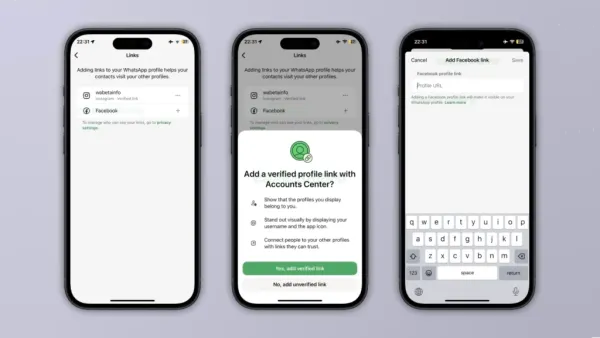
- Users can add their Facebook profile URL directly within their WhatsApp profile info page.
- Privacy settings let you control who can view connected profile links.
- Verified links display a Facebook icon via the Accounts Center, confirming ownership authenticity.
- The feature is optional and flexible, supporting both verified and unverified link display preferences.
The new WhatsApp Beta Update now introduces Facebook Profile Links to the iOS version 25.29.10.70. Now it will make the Facebook link integration work as it does in the Android beta version as well, where, in version 2.25.29.16, some Android beta testers were able to add a Facebook profile link to their WhatsApp page.
This feature has now been brought to iOS and will aim to provide a more consistent experience across both platforms. The update also highlights the app’s efforts to improve cross-platform integration, enabling users to connect their social identities within the Meta system.
How the Feature works
The new Facebook profile link feature will allow users to add a direct link to their Facebook account to their WhatsApp profile. Once it is added, the link appears on the user’s contact info screen, allowing others to access their Facebook page.
The process is nearly identical to how users can already add their Instagram profile link. By visiting their profile page directly from the app settings, users can choose to include their Facebook URL, which will also be visible to others depending on the privacy settings.
Managing who can see your Profile Links
WhatsApp lets users control who can view their connected profile links through privacy settings. To do this, users need to navigate to WhatsApp Settings > Privacy > Links. Users can choose whether to make their Facebook link visible to everyone, only their contacts, or no one.
Privacy settings will also give users selective control, allowing them to hide their information from specific contacts or share it only with selected people. This is especially useful for people who only want to limit access to trusted contacts while maintaining privacy from unknown users.
Verified and Unverified Profile Links
When users add the Facebook link, they can either keep it unverified or link it through the Accounts Center for verification. In this case, the verified link will display the Facebook icon, confirming that the account belongs to the same person using WhatsApp.
The verification will also help contacts identify authentic accounts and reduce the risk of impersonation. It is essential to keep in mind, however, that verification only confirms the ownership match and will not prove that the Facebook account itself is genuine or official.
Unverified links will only show the full URL without the Facebook icon, as with unverified Instagram links. This allows users to share their profiles even though they prefer not to connect through the Accounts Center.
Both accounts will maintain the same functionality, differing only in whether they are verified. WhatsApp has offered flexible options for users who want to choose how their social links are displayed, attracting both privacy-conscious users and those seeking verified connections.
The Optionality of displaying the Facebook Profile Link
WhatsApp gives users complete control over whether to add a link to their Facebook profile. Those who are not interested in identifying their Facebook presence do not have to take that step, and it will not affect their experience as users. Linking is optional; even if it’s added, it will work the same as either verified or unverified links, and the user will not lose any functionality or visibility options.
Essentially, users can display a Facebook link without verification if they do not want to connect through the Accounts Center. WhatsApp has added a profile link option, giving users complete flexibility over what they share on their social media profiles.
WhatsApp keeps this link to a Facebook profile optional to support privacy and cross-platform flexibility, further allowing social identity management on WhatsApp to be associated with Facebook. Further, users can experiment with the new linking feature at their own pace. If you have not added your Facebook link, consider doing so in the latest WhatsApp beta. This helps with enhancing your profile and connects a step with your contacts across applications.
Conclusion
The option to include Facebook profile links on the WhatsApp info page has been enabled for a limited number of iOS beta testers. However, installing the latest WhatsApp beta from TestFlight is not a resolute shortcut to the new linking option. WhatsApp is gradually rolling out the feature to select accounts, likely to track performance and gather user feedback. Often, the rollout will even reach some users who have the public App Store version as part of a wider test.
-
Experience ‘Titanic’ in Telangana, just 3 hours from Hyderabad

-
Hantavirus: Evacuated US citizen from cruise ship passengers tests positive

-
From Deepika Padukone’s Dramatic Gown To Alia Bhatt’s Gucci Saree: Bollywood’s Most Talked-About Cannes Looks

-
TMC Says SIR Deletions Exceeded BJP Victory Margins In 31 Seats; Here’s What SC Said

-
Doc Talk | Should India Introduce Airport Screening For Hantavirus? Doctors Weigh In