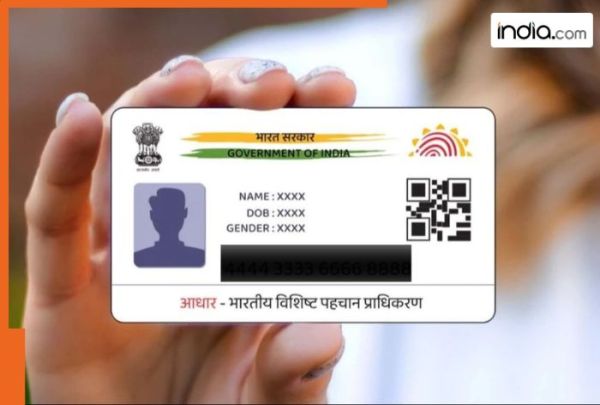
With an aim to provide good governance efficient transparent and targeted delivery of subsidies benefits and services the Unique Identification Authority of India (UIDAI) has issued a distinct 12-digit identification number Aadhaar to residents of India. From receiving pensions and subsidies to applying for mobile connections passports and bank accounts Aadhaar serves as a single identity that can be verified reducing paperwork and preventing duplication. Now residents can change and easily edit their name address date of birth and mobile number online. Thus there will no longer be any need to visit a UID service centre for these updates. Physical paperwork will also be vastly reduced. The Aadhaar card serves as an important identification document for people living in India. It is needed for several government programs and official documents including the PAN card. Therefore connecting citizens to many of the governments services through the Aadhaar card has become a key goal for the UIDAI. Citizens will no longer have to go to an enrolment centre to update their information nor do they need to provide physical documents. Who can update their mobile number on Aadhaar online? Aadhaar cardholders can update their name address date of birth and mobile number via the online process. The update process in the Digital System will streamline and simplify the updating of these details and not require a visit to an Enrolment Centre and the submission of physical documents. Steps to Update Aadhaar Information: Visit the official website for the Aadhaar card. Navigate to the official UIDAI site and choose a language you can best navigate through. Click on My Aadhaar and select Get Aadhaar then select Book an Appointment. After selecting your city or location proceed by clicking on Proceed to Book Appointment. Enter your active mobile number and the CAPTCHA code that appears on your screen then select Generate OTP. After entering the OTP tap “Verify OTP” Provide your Aadhaar Number Full Name (as listed on your Aadhaar) Date of Birth Verification Type with Application State & City and your preferred Aadhaar Seva Kendra. Choose Mobile Number Update from the list of available data fields that need to be updated. Click “Next” and choose an appointment date and time that works for you. After verifying all entered details click “Submit” to confirm your appointment. Arrive at your chosen Aadhaar Seva Kendra on the day of your appointment and wait for your number to be called. You will be required to go through biometric identification to prove your identity before updating your phone number by an official from UIDAI. It is reported that A service charge of Rs 50 will be incurred for the update. You will receive an acknowledgement slip that includes your Update Request Number (URN) which you may use to check online for the status of your update. How can you easily track the Status of Your Updated Aadhaar Mobile Number? After submitting an Aadhaar update/correction form for your registered mobile number YOUR Aadhaar mobile number update progress can be found easily. To track your Aadhaar mobile number update status follow these simple steps: Go to the UIDAI Website (uidai.gov.in) In the My Aadhaar section of the UIDAI website click on the Check Aadhaar Status link in the “Get Aadhaar” section On the myAadhaar web page select Check Enrollment & Update Status Select URN (Update Request Number) Enter the URN along with the CAPTCHA code and then click Submit. This will display on the screen the current status of your request for the Update of your mobile number in Aadhaar.
-
Nandan Nilekani to prepare roadmap for exam reforms: Modi
-
Gen Z protests: The Cockroach chose to approach, not encroach

-
Top 10 | ABP LIVE Evening Bulletin: Top News Headlines from 26 July 2026 - Evening

-
Fashion quote of the day by Iris Apfel: 'Jewellery is the most transformative thing you can wear'

-
Devoleena Bhattacharjee calls for Punjab education minister to resign following Dharmendra Pradhan resignation