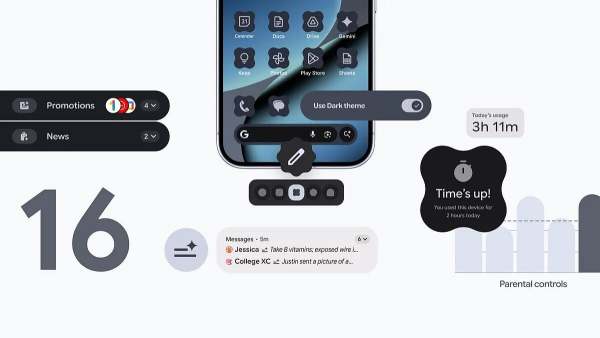
Android 16 QPR2 update is rolling out to Pixel 6, 6 Pro, 6a, Pixel 7, 7 Pro, 7a, Pixel Tablet, Pixel Fold, Pixel 8, 8 Pro, 8a, Pixel 9, 9 Pro, 9 Pro XL, 9 Pro Fold, Pixel 10, Pixel 10 Pro, Pixel 10 Pro XL, and Pixel 10 Pro Fold devices.
Android 16 QPR2 (Quarterly Platform Release 2) update has now been released for eligible Pixel phones. The update is rolling out in batches, and it marks the second biggest update from Google. Android 16 QRP2 comes with additional customisation options, and most importantly the December 2025 security patch that irons out all bugs and vulnerabilities.
Android 16 QRP2 update: Eligible devices
Google announced the commencement of the rollout on its blog. The new Android 16 QPR2 update is rolling out to Pixel 6, 6 Pro, 6a, Pixel 7, 7 Pro, 7a, Pixel Tablet, Pixel Fold, Pixel 8, 8 Pro, 8a, Pixel 9, 9 Pro, 9 Pro XL, 9 Pro Fold, Pixel 10, Pixel 10 Pro, Pixel 10 Pro XL, and Pixel 10 Pro Fold devices.
As you can see, the update is essentially available for Pixel 6 series and newer devices, covering a wide range of Google's smartphone and tablet lineup. Users enrolled in the Android Beta Program will need to opt out to receive the stable version, though devices will not be wiped during the transition.
Android 16 QRP2 Update: What's new?
1. The update introduces several personalisation features like custom icon shapes that allow users to express their style for the device's home screen, with options including circles, rounded squares, and other geometric designs. There's also themed icons for apps that don't provide them, using a colour filtering algorithm to render existing icons in a monochromatic style. There's also a new Expanded dark theme option.
2. Productivity and organisation: The Notification Organiser utilises on device AI to automatically group and silence lower priority notifications into categories including Promotions, News, Social, and Suggested. Lock screen widgets have finally arrived on Pixel phones after debuting on the Pixel Tablet. Split screen multitasking receives a significant upgrade with a new 90:10 split ratio.
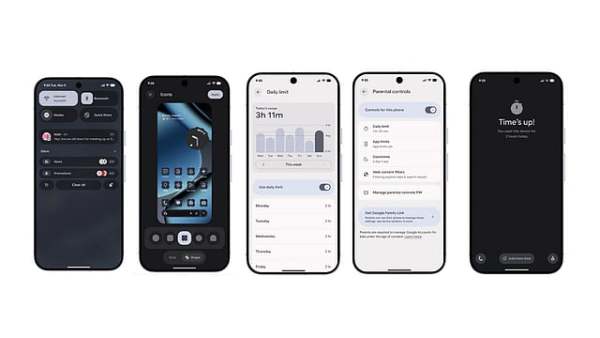
3. Security Enhancements: Identity Check has been expanded to protect third party apps that use biometric prompts. The update also integrates smartwatch support into Identity Check. New protections against SMS one time password hijacking have been implemented.
4. Additional features: Parental Controls have been integrated directly into Android Settings. Enhanced HDR brightness controls allow users to adjust or disable the screen brightening effect associated with HDR content. The update also brings improvements to touchpad and mouse support, including Action Corners that trigger specific actions when the cursor moves into screen corners, enhanced autoclick features, and universal cursor support for seamless navigation between devices and external displays.
How to install the Android QRP2 update
Installing Android 16 QPR2 is straightforward for eligible device owners:
1. Navigate to Settings > System > System update
2. Tap the 'Check for update' button
3. If the update is available, follow the on screen prompts to download and install
4. The device will restart to complete the installation
Users running Android 16 QPR2 Beta 3.3 will receive a small update to transition to the stable release. Those enrolled in the Android Beta Programme must opt out through the Android Beta website to receive the stable version, though this will not wipe device data once the stable OTA becomes widely available.
The update is rolling out gradually, so it may take several days before all eligible devices receive the notification. Users can manually check for updates multiple times if the OTA hasn't appeared on their device yet.
-
India Sets Unwanted World Record With 20 Consecutive ODI Toss Losses
-
Virat Kohli Set For Domestic Return, Confirms Vijay Hazare Trophy Availability
-
‘This Is A Lie’: Congress Hits Back at Rajnath Singh Over Nehru–Babri Masjid Remark

-
DRDO’s High-Speed Fighter Escape System Test Puts India in Global Elite

-
Sportvot x FPJ: Mumbai Premier League 2025–26 Delivers Thrilling Matches