
WhatsApp has evolved beyond a messaging app and now offers multiple financial features through WhatsApp Payments, allowing users to send and receive money directly within chats. Launched in India in November 2020, WhatsApp Payments is based on the UPI infrastructure developed by the National Payments Corporation of India (NPCI). The service supports real-time money transfers and also lets users check their linked bank account balance.

As digital payments become more common, many users link more than one bank account to WhatsApp Payments. To give users greater control, WhatsApp allows them to change their primary bank account or remove a bank account that is no longer in use.
What Is a Primary Bank Account in WhatsApp Payments?
When multiple bank accounts are added to WhatsApp Payments, one account is set as the primary account. This account is used by default for sending and receiving money. Users can switch the primary account at any time, depending on their preference or banking needs.

Why You May Need to Change or Remove a Bank Account
There can be several reasons:
-
You’ve opened a new bank account and want to use it for payments
-
Your existing account is inactive or closed
-
You no longer want a specific bank linked to WhatsApp
-
You want better control over your payment source
WhatsApp provides simple options for both Android and iPhone users to manage these settings.
How to Change the Primary Bank Account in WhatsApp Payments
For Android Users
-
Open WhatsApp on your Android smartphone.
-
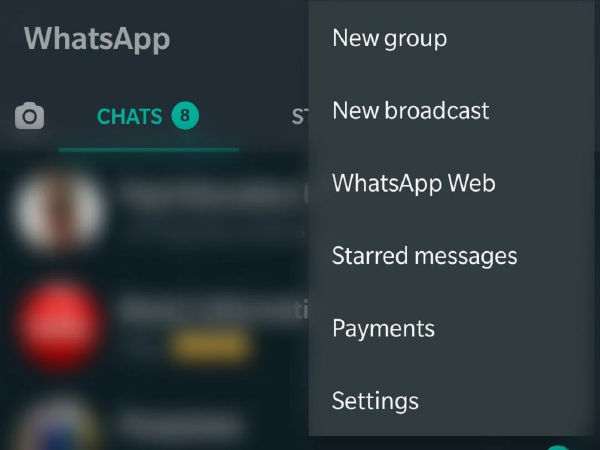
Tap the More Options (three dots) in the top-right corner.
-
Select Payments from the menu.
-
Tap on the bank account you want to set as primary.
-
Select Make primary account.
Once selected, this account will be used for all future transactions.
For iPhone Users
-
Open WhatsApp on your iPhone.
-
Tap Settings at the bottom of the screen.
-
Go to Payments.
-
Tap on the bank account you want to make primary.
-
Select Make primary account.
The change takes effect immediately.
How to Remove a Bank Account from WhatsApp Payments
If you no longer want to use a particular bank account with WhatsApp Payments, you can remove it easily.
Steps to Remove a Bank Account
-
Open WhatsApp and go to Payments.
-
Tap on the bank account you want to remove.
-
Select Remove bank account and confirm.
Once removed, the account will no longer be available for transactions on WhatsApp.
Important Things to Keep in Mind
-
You must have at least one active bank account linked to use WhatsApp Payments
-
Removing a bank account does not affect your bank or UPI account outside WhatsApp
-
Always ensure your WhatsApp app is updated to the latest version
Final Thoughts
WhatsApp Payments offers flexibility and convenience for everyday transactions. The ability to change or remove bank accounts ensures users stay in control of their financial preferences while using the platform. With simple steps and a user-friendly interface, managing bank accounts on WhatsApp is quick and hassle-free.
-
Haryana PSC Veterinary Surgeon Recruitment 2026: Apply Now

-
Watch: Begum Bazaar skies once again leave internet mesmerised

-
Rape case against Bishop Mulakkal: Victim thanks Kerala govt for appointing special prosecutor

-
How to Use Instagram's New Quick Share Feature: Faster Way to Send Posts to Close Contacts

-
Tour of India on a plate: 6 regional thalis to try in Hyderabad