
Central board of secondary education has released the 10th and 12th class admit card 2026. You will get all the information about the date, time, and exam center of the exam to be held in March 2026 in the admit card. But you don’t know how to download admit card online? So there is absolutely no need to take tension. In this article we will tell you how you can download the admit card online.
Let us tell you that regular students cannot download their admit card themselves. Their admit card will be available from the school. At the same time, students who fill private form from open school can download their admit card online themselves and in this article, we will tell you the process of both downloading the admit card of students who fill private form and downloading the admit card received from the school. Let us first know how to download the admit card for those who have filled the private form.
Download admit card for private form candidates like this
First of all you have to visit the official website of CBSE. cbse.gov.in But have to go.
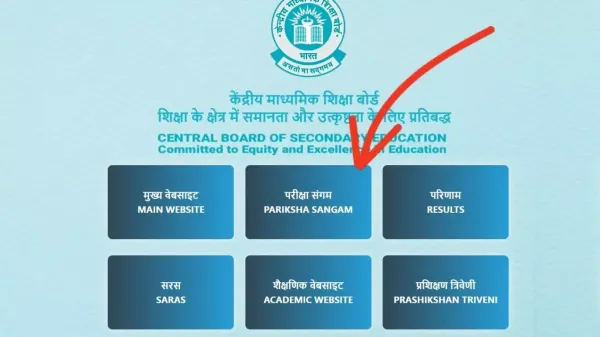
There you have to click on the Pariksha Sangam link.
After which three options will open on your screen. Select Head Office (SARASWATI) from it.
Select the admit card option of your class (10th or 12th).
Login by entering Application Number, Roll Number/Name, and Date of Birth.
Your admit card will appear on the screen. Download the admit card and take a print out of it.
Exam Dates:
CBSE 10th board exam will start from 17th February 2026 and will continue till 11th March 2026. Whereas, class 12th exams will be held from 17th February to 10th April. The exam center and important details of every student will be clearly mentioned on the admit card. Now let us know the process of downloading the admit card received from the school.
How to download admit card?
Students cannot download the admit card directly online, only school authorities (Principal/Head) will download it. The steps are:
First of all you go to the official website of CBSE cbse.gov.in Go in.
Click on “pariksha sangam” link on the home page. After which your screen will look like the photo given below. In which you will have to click on Pariksha Sangam.
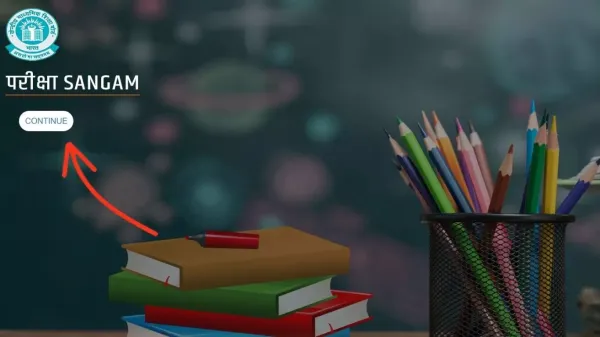
After that as shown in the photo below. However, you will have to click on CONTINUE.
After that you will have to click on the schools option.
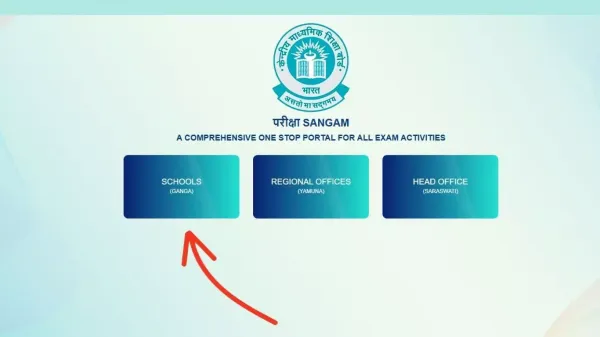
After that go to the option of exam activities.
Click on the link containing admit card there.
Now login by entering your user ID and password.
As soon as you login, 10th and 12th class admit card 2026 will appear on the screen.
You can distribute these admit cards to the students after putting the signature of the principal and the school stamp.
Important information-
It is most important for the student to take only the hard copy of the admit card to the exam centre. Without admit card you will not get entry into the exam centre. For information, let us tell you that CBSE has issued admit cards of about 42 lakh students.
-
BCCI announces third phase of ticket sales as countdown to T20 World Cup 2026 begins

-
Border 2 box office collection: Varun Dhawan gets his first highest-grossing film, earns Rs…

-
The ground feels solid but deep below, Earth is slowly changing

-
UK naval chief says Russia’s Northern Fleet investment remains strong

-
Quant Mutual Fund announces appointment of Mahendra Jajoo as whole time director on AMC board