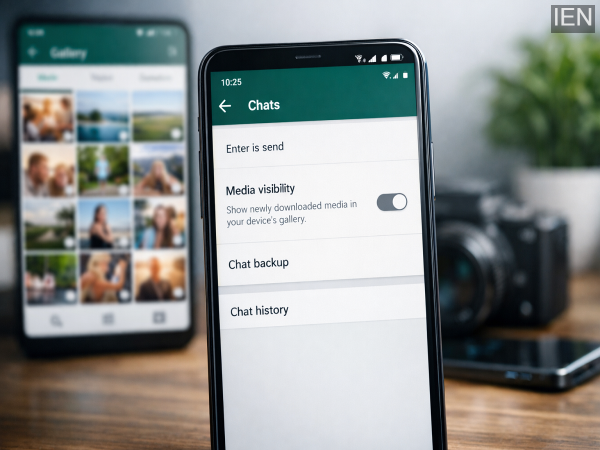
WhatsApp has become an essential communication tool for millions of users worldwide. From personal chats and family groups to office conversations and community updates, the platform handles an enormous volume of messages every day. However, while staying connected is easier than ever, many users face a common problem — WhatsApp media files slowly consuming phone storage and crowding the gallery.
Photos, videos, GIFs, and forwarded media are automatically downloaded and saved, often without users realizing how quickly they accumulate. Over time, this can lead to reduced storage space, slower phone performance, and a messy gallery filled with unwanted images. If your device is running low on space or your gallery feels cluttered, adjusting a few WhatsApp settings can make a significant difference.
Here’s a step-by-step guide to help you prevent WhatsApp from automatically saving media files and keep your device organized.
Why WhatsApp Media Fills Up Your Storage
By default, WhatsApp automatically downloads media files you receive. Once downloaded, these files are saved directly to your phone’s gallery. This default setting, known as Media Visibility, is enabled on most devices.
While this feature makes it convenient to access shared images and videos quickly, it can also create unnecessary duplication and storage overload — especially if you’re part of multiple active group chats.
The good news is that you can control how WhatsApp handles media downloads and visibility.
How to Turn Off Media Visibility on WhatsApp
If you want to stop new media files from appearing in your phone’s gallery, follow these steps:
-
Open WhatsApp on your smartphone.
-
Tap the three-dot menu in the top-right corner.
-
Go to Settings.
-
Select Chats.
-
Toggle off the option labeled Media Visibility.
Once disabled, newly downloaded photos and videos will no longer appear automatically in your gallery.
Important: This change only affects media files received after you update the setting. Existing files already saved on your device will remain in your gallery unless you delete them manually.
Prevent WhatsApp From Saving Media Across All Chats
If you want a broader solution that applies to all conversations — both individual and group chats — ensure that Media Visibility remains turned off under Chat settings.
By disabling this feature, WhatsApp will still download media (depending on your download preferences), but it won’t automatically display them in your gallery app. This helps maintain a cleaner and more organized media library.
Customize Media Settings for Specific Chats or Groups
Sometimes, you may want to allow media saving for close contacts but restrict it for large group chats. WhatsApp gives you the flexibility to manage settings individually.
Here’s how:
-
Open the specific chat or group.
-
Tap the contact name or group title at the top.
-
Select Media Visibility.
-
Choose No.
-
Tap OK to confirm.
This option allows you to control which chats can save media to your gallery, offering a more personalized experience.
Additional Tips to Manage WhatsApp Storage
To further optimize storage, consider these practices:
-
Review Storage Usage: Go to Settings > Storage and Data > Manage Storage to identify large files or frequently forwarded media.
-
Disable Auto-Download: In Storage and Data, adjust media auto-download preferences for mobile data, Wi-Fi, and roaming.
-
Delete Unnecessary Media Regularly: Periodically clear unwanted files from WhatsApp folders.
Managing these settings can significantly improve your phone’s performance and free up valuable storage space.
Keep Your Phone Clean and Organized
WhatsApp is a powerful communication tool, but without proper storage management, it can overwhelm your device. By adjusting Media Visibility settings and customizing chat preferences, you can prevent unnecessary clutter, maintain better storage health, and enjoy smoother phone performance.
A few small changes in settings can go a long way in keeping your smartphone efficient and your gallery free from unwanted media overload.
-
Bank Holidays in May 2026: Check Full RBI List and Plan Your Banking Work in Advance

-
Gold Prices Slip Again: 18K to 24K Rates Fall Across India, Silver Also Declines

-
Silver Prices Ease Again on April 29: Check Latest Rates in Delhi, UP, Bihar and Other Cities

-
Platinum Prices Drop on April 29: Check Latest 10 Gram Rate Across Major Indian Cities
-
Build a Strong Investment Portfolio in FY 2026: 7 Smart Strategies to Handle Market Volatility