Ahead of Holi 2026, users can generate personalised festive images using AI tools like Gemini Nano Banana tool, Midjourney, Adobe Firefly, ChatGPT Images and Stable Diffusion. A curated list of 10 detailed prompts helps create everything from Radha-Krishna art to neon Holi scenes and abstract wallpapers, offering a creative alternative to traditional greetings.
The most colourful week of the year has arrived. For Holi 2026, if you want to send something truly unforgettable to your loved ones this year, a personalised AI-generated image might just be the most spectacular Holi wish of all. Tools like Midjourney, Google Gemini Nano Banana 2, ChatGPT's image generator (DALL-E), Adobe Firefly, and Stable Diffusion can conjure breathtaking Festival of Colors scenes in seconds - all you need is the right prompt.
We have done the creative work for you. Below are 10 carefully crafted AI image prompts, each designed to capture a different mood, aesthetic, and moment from India's most visually stunning festival. Simply copy the prompt, paste it into your preferred AI image tool, and hit generate. Then send the result to anyone you want to wish a happy Holi.
A note on tools: Midjourney and Adobe Firefly tend to produce the most photorealistic results. ChatGPT's image generator (accessed via ChatGPT Plus) and Nano Banana 2 is excellent for beginners. Stable Diffusion offers the most creative control. All prompts below work across all platforms.
The 10 Best AI Prompts for Holi 2026
PROMPT 1: The Classic Color Explosion
Pro tip: Add '--ar 16:9' at the end in Midjourney for a widescreen image perfect for social media stories.
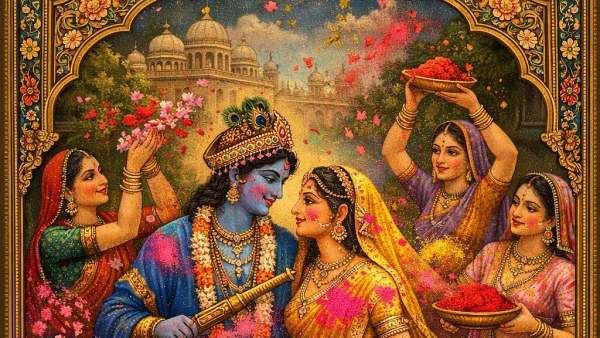
PROMPT 2: Radha and Krishna
Pro tip: Ask ChatGPT to 'make it look like a Rajasthani painting' for an even more traditional aesthetic.
PROMPT 3: The Lone Dancer
PROMPT 4: Holi Night
Pro tip: This works best in Midjourney. Add '--style raw' for a more photographic feel.
PROMPT 5: The Bonfire - Holika Dahan
Pro tip: Great for sending on the evening of March 3. Pair with a 'Happy Holika Dahan' message.
PROMPT 6: Celebrating Holi
PROMPT 7: Aerial Color Symphony
Pro tip: Add 'drone photography, DJI Inspire' to the prompt to push the tool toward more realistic aerial perspectives.
PROMPT 8 : Candid Holi
( Upload your photo alongside) Need a candid shot of mine, completely drenched in coloured water, while celebrating Holi. Put different colours like red, blue and purple on clothes, along with wet hair and a laughing expression. Create an authentic festival atmosphere and sunlight glistening on water droplets.
PROMPT 9: Abstract Holi Art — For Wallpaper
Pro tip: This prompt creates a beautiful color-only image perfect for phone wallpapers or WhatsApp wishes without any people.
PROMPT 10: Global Holi — Unity in Color
Pro tip: Perfect for sending to international friends and colleagues to show Holi's universal message of togetherness.
Tips for Getting the Best Results
Be specific about style. The more detail you give - photography style, lighting, time of day, camera type - the better your result. Vague prompts produce generic images; specific prompts produce stunning ones.
Iterate and refine. AI image generators rarely produce perfection on the first try. Generate 3 to 4 variations of each prompt, then pick the best. Most tools let you 'upscale' your favourite version for full-resolution quality.
Adjust the aspect ratio. For Instagram Stories or WhatsApp statuses, use a 9:16 portrait ratio. For Facebook cover photos or desktop wallpapers, use 16:9 landscape. For profile pictures, go square (1:1).
Try adding a regional flavour. Want Mathura Holi? Add 'Mathura, Uttar Pradesh' to any prompt. Want a more modern, urban celebration? Add 'Mumbai streets, contemporary India'. The more specific the geography, the more accurate the visual context.
-
Download Telangana SSC exam hall tickets 2026 from March 5

-
Capitol scuffle with anti-war activist leaves 3 officers injured
-
Two charred bodies found after fire engulfs building in Delhi

-
Holi clash in Uttar Pradesh’s Barabanki leaves 11 injured
-
Bigg Boss 17’s Anurag Dobhal Alleges Family Torture, Says He Attempted Suicide