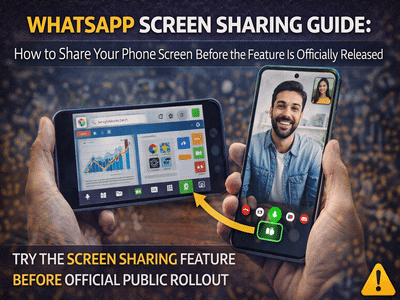
How to Share Your Screen on WhatsApp Before the Official Rollout
Screen sharing is one of the most anticipated features on WhatsApp, and the messaging platform has already begun testing it with select beta users. Although the feature was initially limited to testing phases, users could try it before the official rollout by joining the beta program.
The screen sharing feature allows users to display their phone’s screen to another person during a video call, similar to what is available in popular video conferencing apps. This can be useful for presentations, troubleshooting, demonstrations, or guiding someone through a task on their phone.
If you want to try WhatsApp’s screen sharing feature before it becomes widely available, here is a simple guide explaining how the process works.
What Is WhatsApp Screen Sharing?The screen sharing feature on WhatsApp allows users to share the live display of their smartphone during a video call. When activated, the person on the other end of the call can see everything that appears on your screen in real time.
This feature works similarly to screen sharing tools available on platforms such as video conferencing apps. It can be used for multiple purposes, including:
- Demonstrating app features
- Helping someone troubleshoot phone settings
- Presenting content during a call
- Showing photos, documents, or apps live
Initially, the feature was introduced for beta testers, which means not every user could access it immediately.
Step 1: Join the WhatsApp Beta ProgramTo test the screen sharing feature early, you need to enroll in the WhatsApp beta program.
Follow these steps:
Once you are part of the beta testing program, you will receive access to experimental features that are still under development.
Step 2: Update the App to the Beta VersionAfter joining the beta program, you will need to update WhatsApp to the latest beta version.
Steps to update the app:
Updating the app ensures that you receive the latest experimental features, including the screen sharing option.
Step 3: Start a Video Call on WhatsAppOnce the beta version is installed, open the WhatsApp app and initiate a video call.
Here’s how to do it:
You can also try this feature during group video calls, as screen sharing may work in group conversations as well.
Step 4: Tap the Screen Share ButtonDuring the video call, you may notice a new screen sharing icon on the call interface.
To share your screen:
Once activated, the other person on the call will be able to see your phone screen live.
Important Things to KnowSince the feature was originally introduced in beta testing, it may not appear for all users immediately.
Here are some key points to remember:
- The feature may only be available to selected beta testers.
- If you do not see the screen share option, it may not be enabled for your account yet.
- The feature may become available later as WhatsApp expands beta testing.
Eventually, once testing is complete, the feature will be rolled out to all users through a stable update.
Why Screen Sharing Is UsefulScreen sharing on WhatsApp can make communication more interactive and productive. Instead of explaining something through messages, users can simply show it directly on their screen.
This feature is especially useful for:
- Remote assistance
- Online collaboration
- Teaching or explaining mobile features
- Presenting information quickly
With the growing demand for digital communication tools, such features help make messaging apps more versatile.
Final ThoughtsThe screen sharing feature on WhatsApp was one of the most requested additions by users. While it initially appeared in the beta version, it demonstrated how the messaging platform is evolving to include more interactive communication tools.
If you want to try the feature early, joining the beta program may give you access before the official public rollout.
-
Celebration of Lakshmi Adora Festival in Morigaon District

-
How Ayushmaan Sethi Fell Victim to a Shocking Credit Card Scam

-
Queen's firm warning from mother-in-law revealed during tense exchange

-
Gunfire Erupts at High-Profile Event in Washington, Prompting Swift Security Response
-
'Vellichudare' from Vishnu Vishal, Mamitha Baiju's 'Irandu Vaanam' released