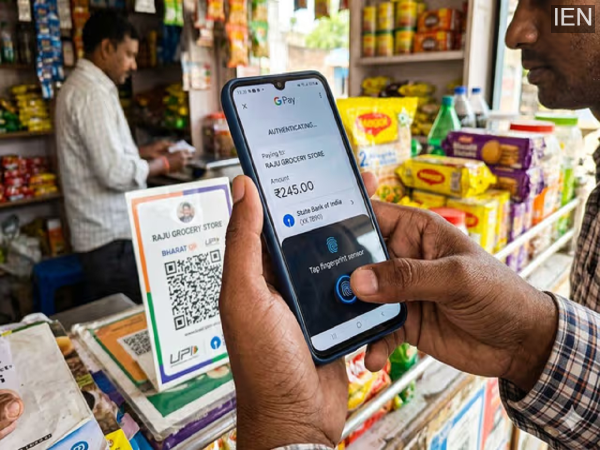
UPI Biometric Payments: You can now bid farewell to the hassle of repeatedly entering a PIN every time you make a UPI payment. With the help of a new biometric feature, you can authorize payments simply using your fingerprint or Face ID. Let us walk you through the entire process.
Entering a PIN every time you make a UPI payment can often feel slow and somewhat tedious. Moreover, due to people standing nearby, you often find yourself glancing left and right while typing your PIN to ensure privacy. In such scenarios, biometric payments make this entire process significantly easier. With this feature, you can authorize a payment in just a few seconds using only your fingerprint or Face ID. At first glance, this feature might seem a bit technical, but in reality, setting it up is quite simple. Let us explain the complete setup process to you.
Things to Know Before Setting Up UPI Biometric Payments
- For safety purposes, an initial transaction limit of ₹5,000 has been set.
- If you do not use this feature for 90 days, you will be required to verify your identity using your PIN before you can use it again.
- If you reset your UPI PIN or change your phone's screen lock, the biometric payment feature will automatically be disabled.
- The fingerprint scanner or face unlock feature on your smartphone must be functioning correctly.
- Additionally, the specific UPI app you are using must be updated to its latest version.
- Your bank account must be linked to your Aadhaar, as the system often utilizes biometric data linked to Aadhaar for the initial verification process.
How to Set Up UPI Biometric Payments
Before outlining the steps below, please note that the exact steps may vary slightly depending on the specific UPI app you are using.
- First, open your UPI app and navigate to the 'Profile' section.
- Now, go to 'Settings' and look for the 'UPI & Payments Settings' option.
- Here, you will find the 'Biometric Authentication' option; simply enable it. Next, follow the on-screen instructions to register your Fingerprint or Face ID.
- Finally, to activate this feature, you will need to enter your current UPI PIN once.
-
Just 3 hours from Hyderabad lies the viral ‘Ladakh of Telangana’

-
Mamdani says his wife, him received death threats over Gaza

-
Cabinet proposes 10-year jail, Rs 10 cr fine for paper leaks: Report

-
Dia Mirza on Hyderabadi tehzeeb: ‘Pait mein mundi daalke salaam karte the’

-
Siaha Students Unite for Education Reform Amid NEET Controversy