Provident Fund Guide: How to Merge Multiple EPF Accounts Online After Switching Jobs
Changing jobs is common in today’s professional world, but it often leads to an issue many employees overlook — having multiple Employees’ Provident Fund (EPF) accounts. Each time an employee joins a new company, a fresh PF account may be created, leaving previous accounts inactive or separate.
This can create confusion when tracking PF balances, transferring funds, or withdrawing money later. To avoid such complications, employees should merge or transfer their old PF accounts into a single account linked with their Universal Account Number.
The Employees' Provident Fund Organisation provides an online facility that allows employees to merge multiple PF accounts easily through its portal.
Why Do Multiple PF Accounts Get Created?Many employees switch companies several times during their careers. Whenever someone joins a new organization, the employer typically registers them under the Employees’ Provident Fund (EPF) system.
If the employee does not transfer the previous PF balance to the new employer’s account, the earlier PF account remains separate. Over time, this can result in multiple PF accounts under the same employee’s name.
This situation can cause difficulties when employees try to monitor their PF balance or withdraw funds after leaving a job. Keeping all PF accounts merged under one profile helps maintain an accurate service record and ensures that retirement savings remain consolidated.
Role of the Universal Account Number (UAN)Every EPF subscriber in India receives a unique Universal Account Number.
The UAN acts as a central identity that links all PF accounts associated with an employee. Whenever someone changes jobs, they should provide their UAN to the new employer. Doing so ensures that the new PF account is automatically connected with previous accounts.
This linking process helps employees keep their PF contributions, balance details, and employment history in one place.
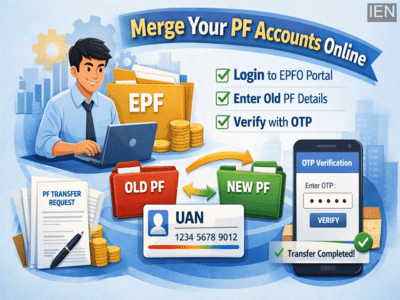
Step-by-Step Guide to Merge PF Accounts OnlineEmployees can merge their PF accounts through the official EPFO Member Sewa Portal by following these steps:
1. Log in to the EPFO PortalVisit the EPFO Member Sewa portal and log in using your UAN and password.
2. Go to Online ServicesAfter logging in, open the “Online Services” section available on the dashboard.
3. Select the Transfer OptionClick on the option “One Member – One EPF Account (Transfer Request)”.
4. Verify Personal DetailsThe portal will display your personal details and current PF account information automatically.
5. Enter Old PF Account DetailsTo merge your earlier PF accounts, you will need to enter the previous Member ID or old PF account number.
6. Click on “Get Details”Once you click this option, the system will fetch information about your earlier PF accounts linked to your profile.
OTP Verification RequiredTo complete the request, employees must verify their identity through OTP authentication.
After clicking “Get OTP”, a one-time password will be sent to the registered mobile number linked with the UAN. Enter the OTP on the portal and submit the request.
Once the OTP verification is completed, the PF account transfer request will be officially registered in the EPFO system.
What Happens After Submitting the Request?After the employee submits the transfer request online, the process moves through the following stages:
Employer Approval:
The current employer reviews and approves the transfer request.
EPFO Processing:
After employer approval, the EPFO processes the request.
Balance Transfer:
The PF balance from the previous account is transferred to the latest active PF account linked to the employee’s UAN.
Once the process is complete, the employee will see all PF contributions consolidated in one account, making it easier to track savings and withdraw funds when needed.
Why Merging PF Accounts Is ImportantCombining multiple PF accounts offers several benefits:
-
Keeps all retirement savings in one place
-
Maintains a continuous service record
-
Simplifies PF balance tracking
-
Makes withdrawals and claims easier
-
Reduces the risk of inactive accounts
Experts recommend that employees transfer their PF accounts immediately after changing jobs instead of leaving old accounts inactive.
Final Advice for EmployeesIf you have switched jobs multiple times, it is important to check whether you have more than one PF account linked to your name. Merging them under a single UAN ensures better financial management and avoids complications in the future.
With the EPFO’s online system, employees can now complete the process quickly, securely, and without visiting any office, making it easier than ever to manage Provident Fund accounts efficiently.
-
'An eye-opening experience' - Liam Livingstone reflects on heartbreaking period of being dropped from England team

-
BTS Gears Up for Exciting Comeback with New Album ARIRANG

-
Arsenal line ups vs Bayer Leverkusen decided as Max Dowman agreement reached

-
Chelsea star Pedro Neto discovers UEFA ban decision for PSG clash after shoving ball boy

-
Gujarat HC hails Ahmedabad civic body's plastic waste management, suggests model for other cities