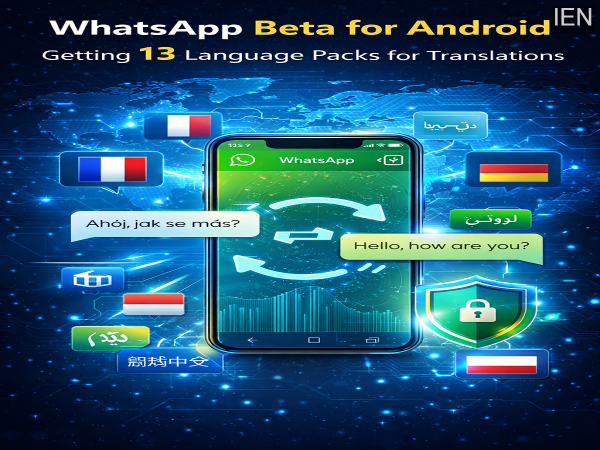
In a major step toward making conversations more seamless worldwide, WhatsApp has introduced 13 new language packs in its latest Android beta update. This upgrade significantly enhances the app’s built-in translation feature, allowing users to communicate more easily across different languages.
With this update, the total number of supported languages has increased from 6 to 19 (excluding auto-detection), making the platform more inclusive for users across Europe, Asia, and the Middle East.
A Big Leap in WhatsApp’s Translation Capabilities
According to reports from WABetaInfo, the new feature is part of Android beta version 2.26.12.4. The update expands WhatsApp’s ability to translate messages directly within chats.
Earlier, the feature supported only a limited number of languages. Now, users can enjoy a broader and more diverse translation experience without relying on external apps.
Privacy-Focused: Translation Happens On Your Device
One of the standout features of this update is its strong focus on privacy. WhatsApp is using on-device translation technology, ensuring that your messages remain secure.
Here’s how it works:
- Language packs are downloaded directly to your phone
- Translations are processed locally on your device
- No data is sent to external cloud servers
This means your chats remain protected under WhatsApp’s end-to-end encryption, maintaining complete privacy during translation.
List of Newly Added Languages
The 13 new languages added in this update cover a wide range of regions:
Europe:
- Czech
- German
- French
- Italian
- Dutch
- Polish
- Swedish
- Ukrainian
- Latvian
Asia & Middle East:
- Indonesian
- Turkish
- Urdu
- Simplified Chinese
These are in addition to previously supported languages such as English, Arabic, Spanish, Hindi, Portuguese, and Russian. A special pack also enables automatic language detection for incoming messages.
How the Translation Feature Works
For users who have access to the beta feature, translating messages is quick and simple:
- Download the required language pack
- Select a message in the chat
- Tap the translate option
- View the message in your preferred language instantly
This feature is particularly useful for international communication, travel, and multilingual conversations.
What’s Next: Voice Translation Possibilities
While the current feature focuses on text translation, experts suggest that WhatsApp may soon expand it further.
Future updates could include:
- Voice message transcription
- Real-time voice translation
- Enhanced multilingual chat tools
This would make communication even more accessible, especially for users who rely on voice notes.
Availability and Rollout Timeline
At present, the feature is available only to a limited number of Android beta testers who have installed the latest version from the Google Play Store.
If you don’t see the feature yet, there’s no need to worry. WhatsApp typically rolls out new updates in phases:
- First to a small group of beta users
- Then to a wider beta audience
- Finally to all users globally
A full rollout is expected later in 2026 after testing is complete.
Why This Update Matters
This update highlights WhatsApp’s focus on:
- Enhancing global communication
- Strengthening user privacy
- Reducing dependency on third-party apps
By combining translation with end-to-end encryption, WhatsApp is offering a secure and convenient way to connect across languages.
Conclusion
The addition of 13 new language packs in WhatsApp’s Android beta is a significant upgrade that makes cross-language communication easier and more secure. With on-device translation and expanded language support, users can now chat effortlessly with people from different regions.
As the feature rolls out more widely, it is set to become a powerful tool for breaking language barriers in everyday conversations.
-
Delhi Budget 2026: CM Rekha Gupta Unveils ₹19,000 Crore Education Boost With Free Bikes For Girls & Laptops For Top Students
-
Ram Gopal Varma & Dhurandhar 2 Director Aditya Dhar To Team Up For A Movie: Report

-
Mary Berry's true colours laid bare by BBC star neighbour as she turns 91

-
Mary Berry's true colours laid bare by BBC star neighbour as she turns 91

-
Bijoy Varghese Earns First Call-Up to Indian National Football Team