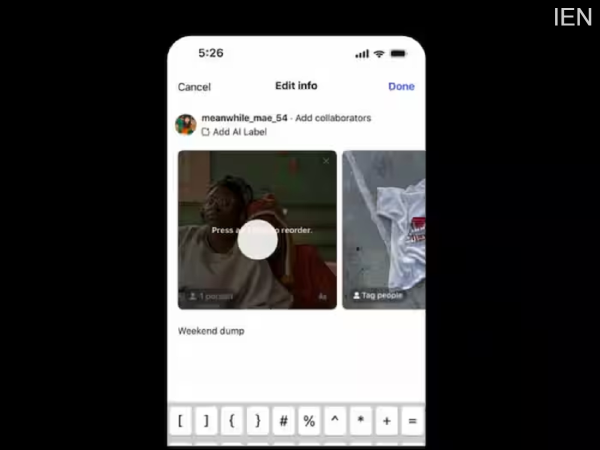
After a long wait, Instagram has resolved a significant issue for its users. Users can now rearrange the photos within a post into the correct order, even after the post has already been published.
Instagram is a popular photo and video-sharing platform. Meta continuously introduces new features to make its platform more convenient for users. In this latest development, Instagram has addressed a long-standing grievance of its user base. The "Reorder Carousel" feature has now arrived on Instagram. With this feature, users can rearrange the order of photos and videos within a post even after they have been uploaded. Previously, once an Instagram post was published, there was no way to rearrange the sequence of the photos and videos contained within it by shifting them around. However, this issue has now been resolved. Let's look at all the details.
Instagram recently announced details regarding its new features. Under this new feature, you can rearrange the photos and videos within a carousel post—shifting their order forward or backward—even after the post has gone live on Instagram. The company publicly announced this feature by sharing a video on its Twitter account.
Ready to level up your photo dumps? ➡️ You can now reorder your pics and vids after posting. pic.twitter.com/6BD5d883Kd
— Instagram (@instagram) March 23, 2026
How to Reorder a Carousel Post on Instagram
1. First, open the Instagram app on your smartphone.
2. Now, navigate to your profile.
3. Next, click on the specific carousel post you wish to edit to open it.
4. Now, click on the three dots located in the top corner of the post.
5. Here, tap on the "Edit" option.
6. Finally, long-press on the specific photo you wish to move within the post, and then drag it to rearrange its position.
As mentioned earlier, until now, there was no facility available on Instagram to rearrange the order of photos and videos within a post. Previously, if a photo ended up in the wrong position—either too far forward or too far back—within a post, you would have to delete the entire post and then re-upload it by selecting the photos in the correct sequence.
-
Veteran actor-director EA Rajendran dies at 71
-
Four Cities, One Tour: Paresh Pahuja's Love Notes Tour Is Arguably The Best Thing On Your Upcoming Calendar
-
Paresh Pahuja's Love Notes Tour Is Coming To Four Cities And Your Upcoming Calendar Should Make Room

-
13 killed in Andhra bus fire, CM Naidu condoles
-
IPL 2026: All-Indian Captains Set for Epic Clash — Who Will Outshine Whom?