E-challan app scam hits Android users: How to stay safe
26 Mar 2026
The Indian government has issued a warning to Android users about a sophisticated malware campaign.
The attack, first reported on March 17, 2026, mimics Regional Transport Office (RTO) and e-challan notifications to steal sensitive personal and financial information.
Fraudulent messages are used to lure unsuspecting users into downloading malicious applications disguised as official services.
How the malware campaign works
Operation details
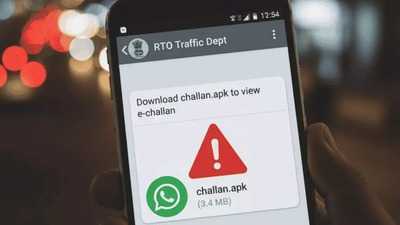
The malicious campaign usually begins with a message claiming that a traffic challan has been issued, and asking the recipient to download a receipt through a link.
These messages may contain APK files or links redirecting to malicious apps with names like "RTO Challan.apk," "RTO E Challan.apk," "MParivahan.apk," or similar variations.
Once downloaded, these apps appear legitimate but actually serve as multi-stage dropper malware.
Malware can intercept OTPs, leading to unauthorized financial transactions
Stealth tactics
Once activated, the malware may not show up in the application list, allowing it to run silently in the background.
The advisory warns that this malware asks for sensitive permissions like SMS access, phone calls, and background running capabilities.
These permissions let attackers track communications, intercept messages, and control device functions.
A major threat is OTP interception via SMS which lets attackers bypass authentication systems for unauthorized financial transactions.
How to stay safe from such attacks
Safety measures
The government has advised users to verify all traffic challans only through official portals like echallan.parivahan.gov.in or state traffic police websites/apps.
Users are also advised against downloading APK files from WhatsApp, SMS, Telegram, or unknown websites.
The "Install from unknown sources" option should be kept disabled unless absolutely necessary and only for trusted sources.
If a suspicious message is received, it should be deleted immediately.
What to do if you have downloaded a malicious app
Infection response
For users who may have unknowingly downloaded a malicious app, the advisory suggests immediate action.
This includes disconnecting from mobile data or Wi-Fi to limit further data transmission.
Users should head over to Settings and uninstall any suspicious apps, including fake e-challan apps. Running a trusted mobile antivirus scan is also recommended.
Further, users should change passwords, update UPI PINs, and monitor bank statements for unauthorized transactions.
-
Courage to survive or insanity? When death was at hand… he set the whole island on fire! Escape from the thrill of the sea

-
Moong dal will keep blood sugar under control, adopt this easy method

-
Is it love or just a mental obsession? Are you a victim of Limerence? Know the difference between real and fake love

-
Center of perfume industry and its cultural heritage

-
Venus will change constellations 3 times in April, auspicious sign for these 4 zodiac signs, doors of luck will open!