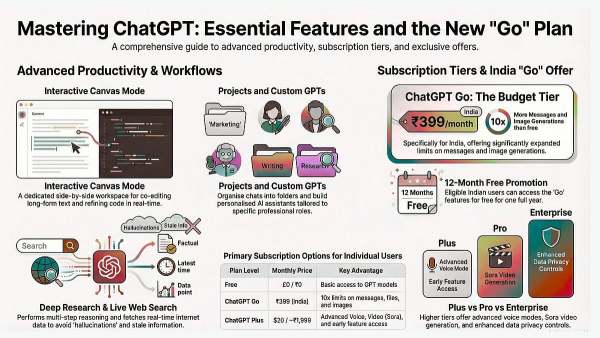
Discover every ChatGPT feature explained simply: voice mode, custom GPTs, projects, agent mode, connectors and more. Practical tips for students to professionals.
ChatGPT has evolved from a simple chatbot into a comprehensive AI assistant that can write code, analyse data, generate images, browse the web, and even take actions on your behalf. Whether you're a student researching assignments, a professional streamlining workflows, or a creator exploring new possibilities, understanding how to use ChatGPT effectively can transform how you work. This article breaks down every major feature so you can extract maximum value from the platform, regardless of your industry or technical background.
What Is ChatGPT?
ChatGPT is an AI chatbot developed by OpenAI that generates human-like text responses through natural language processing. It functions as a versatile creative assistant capable of engaging in fluid conversation, writing and debugging code, translating languages, summarising documents, and answering complex questions. The system is designed to feel conversational and approachable rather than robotic, making it accessible to users without technical expertise.
At its core, ChatGPT processes your prompts through large language models trained on vast amounts of text data. When you type a question or request, the system analyses your input, considers context from the conversation, and generates a response word by word. The latest versions can access the internet for real-time information, interpret images you share, and remember details about you across sessions to provide increasingly personalised assistance.
-
South Korean female celebrities spark concern over extreme weight loss

-
Top free Poki games of April 2026 you shouldn’t miss
-
Office Air Theory Explains Why You Look So Disheveled At The End Of The Workday

-
The Luckiest Day Of The Week For Each Zodiac Sign From April 6 – 12, 2026

-
Michelin restaurants in Thailand strained by surging oil prices, fewer tourists