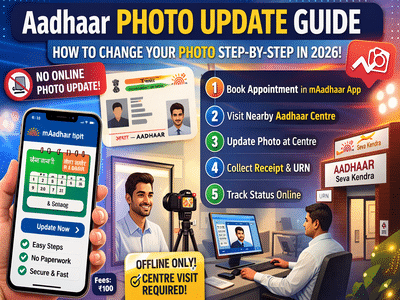
Updating your Aadhaar details has become easier in recent years—but when it comes to changing your Aadhaar photo, there’s still a lot of confusion. Many users believe it can be done online, but the truth is different.
According to guidelines from UIDAI, Aadhaar photo updates cannot be completed online. While apps and portals can help with booking, the final process requires a visit to a physical centre.
Here’s a clear and updated guide to help you avoid mistakes.
Why Updating Your Aadhaar Photo Is ImportantYour Aadhaar card is used across multiple services:
- Banking and KYC verification
- Government schemes
- Travel and identity checks
If your photo is outdated or unclear, it can lead to:
- Identity mismatch during verification
- Delays in approvals
- Possible rejection in banking or official processes
Banks and institutions often match your live face with your Aadhaar image, so keeping it updated is essential.
Can You Update Aadhaar Photo Online?No, you cannot update your Aadhaar photo online.
However, you can use:
- The mAadhaar app
- UIDAI website
👉 Only to book an appointment at the nearest Aadhaar Seva Kendra.
The actual photo update happens physically at the centre.
Step-by-Step: How to Update Aadhaar PhotoFollow these simple steps:
Step 1: Book Appointment- Download and open the mAadhaar app
- Log in using your registered mobile number
- Select “Book Appointment”
- Select your city
- Pick the nearest Aadhaar Seva Kendra
- Choose a convenient date and time
- Choose “Photo Update” or “Biometric Update”
- Go to the selected centre on your scheduled date
- Inform the staff about photo update request
- Provide biometric verification (fingerprint/iris scan)
- Get your new photo captured on the spot
- Pay around ₹100 as update charge
- Collect acknowledgement slip with URN (Update Request Number)
- Use URN on UIDAI portal to track update
- Download updated Aadhaar once processed
✔ Photo update is not available online
✔ mAadhaar app is only for appointment booking
✔ Biometric verification is mandatory
✔ Carry your Aadhaar number and registered mobile
- Believing fake online photo update services
- Skipping appointment booking and visiting without slot
- Not checking details before final submission
Always rely on official platforms to avoid fraud.
Final TakeawayWhile Aadhaar updates like address and mobile number are moving online, photo updates still require a physical visit for security reasons. The process is simple, but knowing the correct steps can save you time and confusion.
If your Aadhaar photo is old or unclear, it’s best to update it soon to avoid issues in future verifications.
Disclaimer: Always use official UIDAI platforms and authorised centres for Aadhaar updates. Avoid third-party agents to prevent fraud or data misuse.
-
Is Scarlet Witch Making a Comeback in Avengers: Doomsday? Elizabeth Olsen Weighs In!

-
Did Lisa Kudrow Receive Messages from Her Late Mother? Unexplained Signs Revealed!

-
Vivienne Jolie-Pitt Seeks Name Change: What's Behind This Family Trend?

-
Salman Khan Stands with Students Amid NEET Protests: A Call for Educational Reform

-
Houthi Group Targets Saudi Oil Tankers in Red Sea Attack