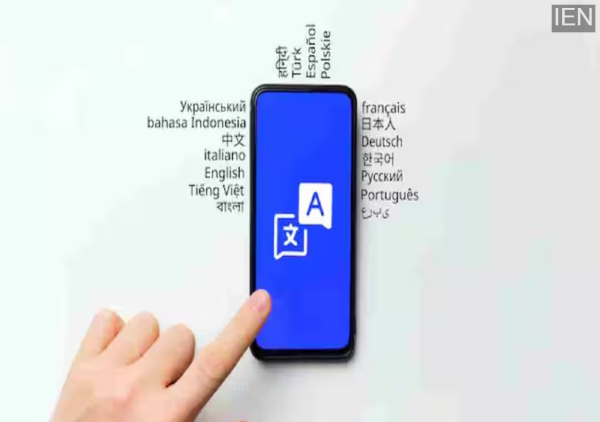
Google Translate: Google revealed that, over the past two decades, the most translated phrase on its platform was neither a complex nor a technical line.
Google Translate: In today’s world, understanding a foreign language is no longer as difficult as it once was. Whether it involves traveling abroad, reading a website in another language, or conversing with someone sitting in any corner of the globe, Google Translate has provided immense assistance to millions of people over the last 20 years. Now, this popular translation platform has completed its 20th year, and to mark the occasion, Google has shared an intriguing piece of information that has captured the attention of internet users.
“Thank You” — The Most Translated Phrase in the World
Google revealed that, over the past two decades, the most translated phrase on its platform was neither a complex nor a technical line. The most frequently used phrase was “Thank You” (or Dhanyawad). Sharing this insight on social media, the company noted that people across the globe, speaking various languages, most frequently seek to express this particular sentiment.
Over 20 years, the most translated phrase on Google Translate wasn’t complicated at all.
— Google India (@GoogleIndia) May 9, 2026
It was simply: 'thank you.' 💙
Celebrating 20 years of Google Translate ✨ pic.twitter.com/VMTMXGpZot
The post displayed “Thank You” in numerous languages, conveying the message that technology serves not merely as a conduit for sharing information, but has also evolved into a medium for connecting people on an emotional level.
A Small Detail, A Big Message
Upon the revelation of this information, people on social media reacted in a highly positive manner. Many users responded by posting “Thank You” in various different languages. People remarked that this demonstrates that, regardless of a person’s country or language, sentiments such as politeness and gratitude remain universal across all cultures.
In reality, people do not utilize translation apps solely for deciphering complex words or lengthy sentences. Often, simple interactions—such as expressing gratitude to someone or showing respect—become the easiest way to bridge the language barrier.
How Google Translate’s Journey Has Evolved
Launched in 2006, Google Translate began as a relatively simple translation tool. At that time, it primarily performed direct, word-for-word translations of words and sentences. However, over time, AI technology was integrated into the platform, and it has now become far more sophisticated than ever before. Today, Google Translate does not merely understand the meaning of individual words; it also attempts to grasp the context of entire sentences, the tone of voice, and the overall conversational style. This is precisely why it is now being utilized across a wide range of applications—from academic studies and business meetings to travel, social media, and content creation.
Now, It Won’t Just Translate—It Will Teach You How to Speak
To mark its 20th anniversary, Google has introduced a new AI-powered feature. This feature is designed to assist users in mastering the correct pronunciation of words in a foreign language. The Translate app now includes a new option aptly named “Pronounce.” When a user speaks a word or sentence aloud to repeat it, the AI analyzes their voice to provide feedback on the accuracy of their pronunciation and identify areas that require improvement.
Google’s objective is not to instantly transform users into language experts, but rather to instill greater confidence in their ability to speak a second language. A demo shared by the company illustrates that, rather than employing strict grading criteria, the app facilitates error correction in a gentle and encouraging manner.
New Feature Launched in India
Currently, this new “Pronunciation Practice” feature is available in India and the United States. At present, it supports languages such as English, Hindi, and Spanish. Given that users have long been requesting a pronunciation practice feature within Google Translate, this update is expected to prove immensely beneficial for language learners.
-
CPI(M) Takes Swipe At Congress Over Kerala CM Deadlock, Says UDF Unity ‘Exposed’
-
EU Clears New Sanctions Against Israeli Settlers In West Bank

-
SportVot X FPJ: Kurlai Saphale And Ankur Clinch Titles At Balyogi Sadanand Baba Chashak Kabaddi Tournament In Mumbai

-
Sunil Pal Says He Felt Targeted On Kapil Sharma Show: 'People Were Giving Extreme Reactions To Samay Raina's Smallest Joke'

-
How to read the classics in an age of distraction (and three short books to get you going)