Instagram has recently introduced a new feature called “Instants,” aimed at making photo sharing faster, more personal, and temporary. The feature is designed to compete with disappearing-content platforms like Snapchat by allowing users to instantly send photos to friends through a simplified camera interface. However, while the feature is gaining attention, many users are already looking for ways to disable it due to accidental sharing issues and confusion around how it works.
The new addition has sparked mixed reactions across social media. Some users appreciate the quick-sharing concept, while others feel the feature is intrusive and difficult to control. Complaints have mainly focused on accidental photo sharing, unclear sending notifications, and the inability to fully understand who receives the images.
If you are among the users who do not want to use the Instants feature, there is a simple method to hide or disable it inside the app settings.
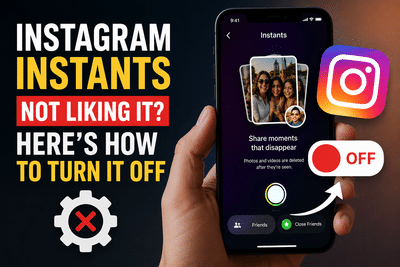
What Is Instagram Instants?Instants is a temporary photo-sharing feature integrated directly into the Instagram inbox. The feature allows users to instantly capture and send disappearing images to friends or close friends without going through the traditional story or direct message process.
Instagram is currently promoting the feature using pop-up notifications and inbox prompts. Inside the chat section, Instants appears as a small photo stack icon. Once users tap on it, Instagram introduces a quick camera interface with a shutter button placed at the bottom of the screen.
Users can choose whether they want to send the image to all friends or only their close friends list. However, by default, the feature is reportedly set to “Friends,” which means photos may automatically be shared with a wider audience unless manually changed before sending.
The feature is part of Instagram’s broader effort to strengthen private and real-time sharing on the platform as competition in the temporary-content space continues to grow.
Why Many Users Are Unhappy With InstantsAlthough the idea behind Instants is simple, several users claim the feature has created confusion inside the app. One of the biggest complaints is that Instagram has not clearly explained the sending process.
As a result, some users are reportedly sharing photos with people unintentionally, including contacts they did not want to send images to. Many users say they struggle to understand exactly when the image gets sent after pressing the shutter button.
Instagram does provide an “Undo” option, but it only works before the recipient opens the image. Once the photo is viewed, users can no longer cancel the delivery.
Because of these issues, a growing number of users are searching for ways to remove the feature from their inbox entirely.
How to Turn Off Instants on InstagramFortunately, Instagram has included an option that allows users to hide Instants from the inbox. The process is simple and can be completed in just a few steps.
To disable the feature:
Once enabled, the Instants feature will disappear from your inbox interface.
However, users should note that enabling this setting will also prevent them from seeing Instants sent by friends. In other words, the feature will be hidden completely from the inbox experience.
Instagram Expanding Its Temporary Content StrategyThe launch of Instants reflects Instagram’s continued push toward real-time, casual communication features. Social media platforms are increasingly focusing on disappearing content, private interactions, and quick camera-based sharing as user habits continue evolving.
Industry experts believe Instagram is trying to attract younger audiences who actively use temporary-sharing apps and fast communication tools. Features like Instants are intended to make interactions feel more spontaneous and less formal compared to traditional posts or stories.
However, early user feedback suggests the company may still need to improve the feature’s interface and provide clearer guidance on how sharing controls work.
Users Advised to Review Privacy SettingsAs new features continue rolling out on social media apps, users are being encouraged to regularly review privacy and sharing settings. Since features like Instants involve rapid photo sharing, accidental mistakes can happen more easily if default audience settings are not checked carefully.
Users concerned about privacy or unwanted sharing should ensure they understand who can receive their content before using quick-share tools.
For now, Instagram users who do not wish to use Instants can easily hide the feature using the built-in settings option while waiting to see whether future updates improve the overall experience.
-
Love Horoscope Today for Saturday, May 16, 2026: Pisces will keep their partner happy, know the condition of other signs
-
Aquarius Tarot Horoscope Today, May 16, 2026: Exchange of Auspicious Messages Will Increase, Benefit of Artistic Thinking
-
Career Horoscope Today, May 16, 2026: Sagittarius Will Succeed, Check the Career Outlook for All Zodiac Signs

-
Pisces Tarot Horoscope Today, May 16, 2026: Success in tasks and focus on savings growth
-
Gemini Tarot Horoscope Today, May 16, 2026: Continue to make positive strides in all matters and stay focused on your goals