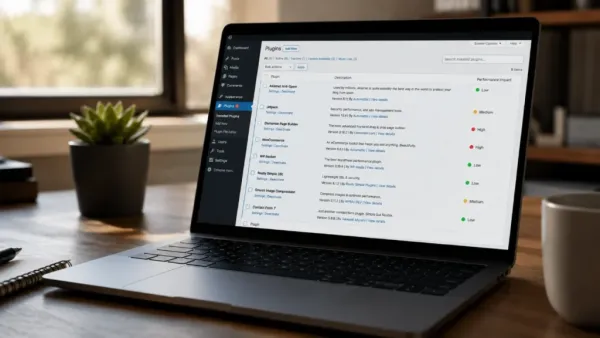
Plugin performance: These days, modern websites are built faster than ever. Whether you’re launching an online store, a corporate site, a SaaS dashboard, or even a simple personal blog, developers can add pretty complex functionality in minutes just by installing plugins. Need a contact form? Add a plugin. Want SEO optimization? Add another one. Looking for analytics, security, image optimization, backups, caching, or even AI-driven chatbots? Sure, there’s a plugin for that, almost always.
This flexibility has basically turned platforms like WordPress, Shopify, Magento, and other content management systems into full-on website ecosystems. But here’s the catch: each plugin also brings extra code that browsers and servers have to chew through. Even if one single, well-designed plugin is mostly harmless, running dozens at the same time can change things fast. It can affect page speed, database efficiency, server response times, and also frontend rendering, plus your overall user experience.
In 2026, website speed is even more important than before. Search engines are rewarding speed more and more, users want loading that feels near-instant, and businesses have noticed that small performance wins can lead to higher engagement and conversions. So, understanding what plugins do to performance is now a pretty necessary part of modern web development.
Why Plugins Mess With Website Performance
Plugins are basically software extensions, right? They add new capabilities by bringing in extra PHP code plus JavaScript files, CSS rules, images, fonts, APIs, and sometimes even more database operations than you’d expect. So every time someone opens a page, the server has to go through all the active plugins first, before it can assemble and send the final page.
That means the more “things” a plugin tries to do, the more time page generation needs. The overall slowdown usually comes down to a few different things like code quality, how many database lookups happen, whether there are external API calls, how heavy the JavaScript execution is, what kind of CSS resources get loaded, and how much memory all that consumes. It’s not one-size-fits-all.
Some plugins are almost weightless, doing one small task well, so the impact might be nearly invisible. Other plugins that are poorly optimized can noticeably stretch loading times, even if you only use one plugin by itself.
The Hidden Cost of Database Queries
One of the biggest contributors to plugin- slowdowns is database activity. A lot of plugins constantly interact with the website database to pull, like, settings, user information, analytics, or that kind of dynamic content.
Every single database request uses up server resources. And if a plugin is not properly tuned, it may end up doing, for instance:
- repeated database lookups
- duplicate queries
- large table scans
- inefficient indexing
As the website grows, these little problems start becoming more noticeable, in a snowball effect. Like, imagine an e-commerce store handling thousands of products and customer records. It might see slower checkout pages if several plugins keep querying inventory, customer data, coupons, shipping information, and analytics, all at once. What helps is that optimized plugins reduce unnecessary database work and cache frequently requested information whenever it is feasible.
Frontend Scripts and Rendering Delays
Not every performance issue comes from the server, not exactly. Many plugins also end up affecting frontend performance, even if the core logic looks untouched.
Nowadays, plugins quite often pull in:
- JavaScript libraries
- CSS frameworks
- Fonts, and yes, also
- Icons
- Animation scripts
- Tracking pixels
And each extra file increases the browser workload, more than people expect. If those scripts block rendering, or if they load synchronously, visitors might notice:
- Slower page rendering
- Delayed interactions
- Layout shifts, awkward little jumps
- Lower overall responsiveness
In the end, it messes with how users judge the site quality; you can feel it.S o a website that looks great but responds slowly can seem less professional than a simpler page that is faster.
Frontend optimization has therefore turned into one of the most important parts of plugin development.
Core Web Vitals and SEO
Website speed is no longer just about user satisfaction. Search engines increasingly look at technical performance, and they do it through metrics called Core Web Vitals.
These checks cover:
- the Largest Contentful Paint (LCP)
- the Interaction to Next Paint (INP)
- And the Cumulative Layout Shift (CLS)
A few things can mess this up, especially plugins that are poorly tuned. For example, heavy JavaScript tends to stall reactions, and larger media files can slow down the whole rendering phase. Also, widgets that are loaded the wrong way sometimes trigger those annoying layout shifts, not where you expect them.
Since search engines treat these signals as part of page experience, plugin performance can indirectly shape how visible a site is in search. So website optimization is now both a user experience goal and an SEO plan.

Server Load and Scalability
Plugins do affect backend scalability too, more than people think. With every active extension, you end up using a bit of everything, like: CPU resources, Memory, Storage, and network bandwidth. On smaller, low-traffic websites, these impacts can look tiny, even almost nothing. But once there’s a traffic spike, even a merely inefficient plugin can push servers past their limits pretty fast.
Think about an online retailer during a big sales weekend. If several plugins start running expensive background tasks at the same time, the customer pages might get sluggish or at times become unavailable. Because of this, scalable websites usually lean toward plugins that are resource-conscious and, where possible, they add caching support.
Security Plugins: Performance vs Protection
Security plugins are a tug-of-war. A lot of today’s tools tend to do things like malware scanning, login monitoring, firewall inspection, file integrity checks, and traffic analysis. These tools definitely help with protection, but it also uses system resources.
Developers really have to balance what they’re defending against with what they’re costing in performance. As a result, running multiple security plugins that basically perform identical functions often creates extra overhead, with no real added safety. It is usually better to pick one solid, well-maintained security solution instead of stacking several overlapping tools.
Caching Plugins Can Actually Help Performance
It may seem a bit surprising at first, but not all plugins make things slower. IN many cases, caching plugins do the opposite; they can make a site feel much faster, like dramatically s. Instead of rebuilding pages on the fly for every single visitor, the caching system keeps pre-made pages around so they load much faster.
Users get outcomes like:
- reduced server workload
- quicker page delivery
- less database activity
- and improved scalability.
Some of the more modern tools also nudge improvements in browser caching, image compression, CSS minification, and JavaScript optimization. If it’s set up correctly, a caching plugin can kinda balance out the performance cost caused by a bunch of other website parts.
Plugin Conflicts and Website Stability
Of course, speed isn’t the only thing that matters. Plugins can also behave strangely when they’re combined. Conflicts tend to show up when two plugins edit the same function, or when multiple plugins bring in JavaScript that doesn’t really get along. Sometimes even database structures overlap, and then later updates introduce breaking changes without much warning.
When that happens, you might see website crashes, broken layouts, checkout failures, missing content, or login problems. So keeping things stable means you can’t just install every feature you find. Careful plugin choice matters, plus compatibility testing has basically become an essential routine for maintenance.
Why More Plugins Do Not Always Mean Better Functionality
One thing people tend to assume is that if you install more plugins then a website will become better But not really What matters is how well the site actually works, and how efficient it stays, not just how many extras are stacked on top Over time, many websites start collecting plugins for things that are redundant, like features that are no longer used at all, or ones that already exist somewhere else inside the platform Sometimes those same features can even be handled by built in functions, so the extra add-ons are basically a second version of the same deal.
Also, unused plugins don’t just sit there. They quietly add maintenance complexity and widen the attack surface for security issues. That’s why regular plugin audits are useful; they help spot extensions that are unnecessary and can usually be removed without drama. In a lot of situations, deleting just a few duplicated plugins leads to a noticeable performance lift.
Choosing Better Plugins
Not every plugin gets the same amount of attention, and honestly it shouldn’t. When developers are evaluating plugins, it helps to think about details like:
- Active maintenance status
- How often updates actually happen
- Code quality, and practices
- Documentation clarity
- Security track record
- Community reputation
- Performance benchmarks
A popular plugin is not automatically the fastest option. Still, well-managed projects often keep bringing optimization improvements more consistently. In the end, picking lighter, well-supported plugins helps lower long-term maintenance work, while also improving the reliability of the website.
Best Practices for Plugin Optimization
Keeping plugin performance “alive” is more ongoing work than a one-time installation. Like, you don’t just install it and move on, you know. There are a few habits people keep coming back to:
- install only plugins that truly bring value (not just because they’re trending).
- fully remove any unused, abandoned plugins; don’t just disable them.
- keep plugin versions updated on a regular basis.
- test the site performance after every big installation or change.
- use caching where it actually makes sense, not everywhere “by default”.
- optimize database tables from time to time.
- avoid duplicate features spread across multiple plugins.
- watch website performance using analytics plus diagnostic tools.
When you do these, you keep useful functionality while maintaining steady speed and reducing long-term technical debt.
The Future of Website Plugins
Plugin development is shifting fast; honestly, it feels like it moves week to week.

A couple of emerging trends are already pushing how websites stay quick:
- AI-assisted plugin optimization
- automatic performance profiling
- smarter script loading
- component-based architectures
- edge computing integration
- more efficient frontend frameworks
Developers are starting to build plugins that only activate when they’re needed, rather than loading everywhere on every page. That modular approach cuts down on needless resource use, pretty noticeably. And since website performance is getting an even stronger ranking signal, plus users expect snappier experiences, plugin efficiency will probably become a real competitive edge over time.
Conclusion: Better Plugins Make Better Websites
Plugins have transformed modern web building, by letting businesses, creators, and developers of basically any skill level reach advanced features faster Still, every plugin comes with added processing, extra scripts, database work, and ongoing maintenance that you can’t really ignore Sure, a well designed extension can support speed by using caching and other optimizations, but a badly coded one can make things heavier, push extra load onto the server, and lower user satisfaction.
So it’s not really a question of “should” websites use plugins anymore; they almost certainly will. The real obstacle is picking plugins carefully, keeping an eye on performance at all times, and making sure each installed extension brings more benefit than the overhead it adds.
By 2026, successful websites aren’t measured by how many plugins they have installed. It’s about whether those plugins are chosen wisely, tuned well, and kept updated and stable over time. The fastest, most reliable, most user-friendly websites are built not by piling on more features, but by adding the right functionality in the most efficient manner possible.
-
Can Rodri Secure a Place Among Football’s Elite Legends?

-
Golden Lautaro Shines as Roma Plot Their Payback

-
‘Hate men, want to kill husband after drinking alcohol’, created ruckus over teacher’s statement in India’s Got Latent. Samay Raina India’s Got Latent Season 2 Sakshi Jha Man Hater Statement Husband Drinking Controversy Zero Score Viral

-
Andhra Pradesh: TDP leader booked for assault, AP cop for abduction

-
From Sleepless Night to Jackpot: Woman’s Late-Night Phone Scroll Leads to Rs 1.4 Crore Lottery Win