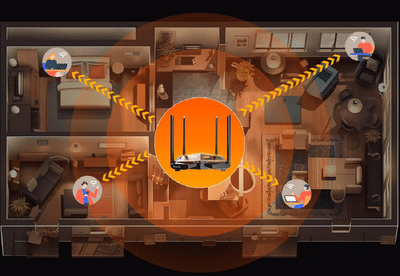
Wi-Fi Speed Tips: A slow internet connection isn't always caused by your broadband provider. In many cases, poor router placement, incorrect network band selection, and too many connected devices can significantly reduce Wi-Fi performance. Making a few simple adjustments can improve your internet speed without upgrading your existing plan.
Why Your Wi-Fi May Be Slowing DownA stable Wi-Fi connection has become essential for everyday activities such as online classes, remote work, video streaming, gaming, and video calls. However, many users experience buffering, slow downloads, and interrupted connections despite subscribing to high-speed broadband plans.
While internet service providers often get the blame, the problem may actually lie inside your home. Factors such as router positioning, network settings, and the number of connected devices can all affect wireless performance.
Here are three common mistakes that may be reducing your Wi-Fi speed.
1. Placing the Router in the Wrong LocationThe position of your Wi-Fi router plays a crucial role in signal strength and coverage.
Many people place the router:
- Inside a cabinet
- In the corner of a room
- Near the floor
- Behind large furniture
- Close to electronic appliances
These locations can block or weaken wireless signals, leading to poor connectivity in different parts of the house.
Best Placement TipsFor stronger coverage:
- Place the router near the center of your home.
- Keep it in an open area rather than inside enclosed spaces.
- Position it on a shelf or elevated surface.
- Keep it away from thick walls, metal objects, televisions, and other electronic devices that may interfere with the signal.
A better router location often results in improved speed and more consistent coverage.
2. Using the Wrong Wi-Fi BandModern dual-band routers typically support both 2.4GHz and 5GHz Wi-Fi frequencies.
2.4GHz Band- Covers a larger area.
- Penetrates walls more effectively.
- May offer lower speeds due to higher congestion from multiple connected devices.
- Provides faster internet speeds.
- Offers lower latency.
- Experiences less interference.
- Works best when you're closer to the router.
If both your router and device support the 5GHz band, switching to it can noticeably improve browsing, streaming, and gaming performance.
3. Connecting Too Many DevicesEvery device connected to your Wi-Fi network shares the available bandwidth.
Even devices that appear idle may continue using data in the background for:
- App updates
- Cloud backups
- Software downloads
- Automatic synchronization
- Streaming services
As more devices compete for bandwidth, internet performance may decline for everyone using the network.
Reduce Unnecessary ConnectionsTo improve performance:
- Disconnect devices that are not currently in use.
- Regularly review the list of connected devices.
- Remove unknown or unauthorized devices from the network.
- Pause background downloads whenever possible.
Managing connected devices can free up bandwidth and improve overall network stability.
Additional Tips for Better Wi-Fi PerformanceBesides avoiding the common mistakes above, users can also improve their internet experience by:
- Restarting the router periodically.
- Updating the router's firmware.
- Using strong Wi-Fi security to prevent unauthorized access.
- Changing the Wi-Fi channel if nearby networks are causing interference.
- Considering a Wi-Fi extender or mesh system for larger homes.
These simple steps can help maintain consistent connectivity across multiple rooms.
Final TakeawayA slow Wi-Fi connection does not always mean you need a faster broadband plan. In many cases, optimizing your router's placement, selecting the appropriate Wi-Fi band, and reducing unnecessary connected devices can significantly improve internet speed and stability.
Before upgrading your internet package, review your home Wi-Fi setup. A few small changes could deliver a noticeable improvement in everyday browsing, streaming, gaming, and remote work performance.
-
Lionel Scaloni reflects on his Argentina future after heartbreaking World Cup final defeat to Spain

-
Pasta, Soy Milk and a Cook: NIA Court Grants Relief To US Terror Accused

-
Video: Man flees with RTC bus in Jagtial, hits three people

-
Emergency Call Without SIM: How can a call be made to 112 even if there is no SIM in the phone? How does the emergency system work?
-
Plants will get nutrition with the help of used aluminum foil, use it in these 4 easy ways