
Hyderabad: WhatsApp announced five new group chat features this week, and one of them will be felt by every user who has ever muted a noisy family or housing-society group. Here is what is new, followed by the quieter features, some launched this year, that matter more for your privacy and safety.
WhatsApp new group chat features
-
@all mentions: Typing “@all” in a message now notifies every member of the group, including those who have muted it. Useful for genuinely time-sensitive messages; irritating in the wrong hands. WhatsApp has built in two limits: in groups of more than 32 people, only admins can use it, and you can mute @all alerts separately in notification settings if someone overuses it.
-
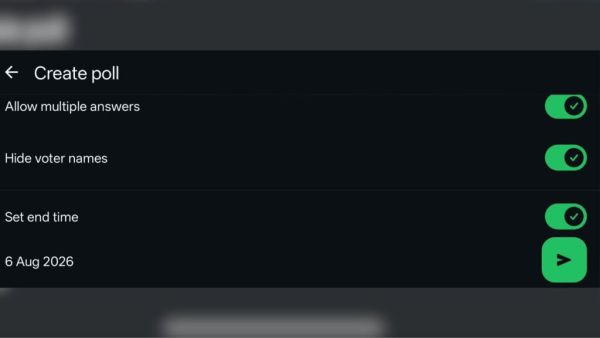
Poll deadlines: Polls in groups can now have a set closing time, so a vote actually ends instead of drifting on for days.
-
Anonymous polls: The poll creator can hide voters’ names: votes are counted but not attributed. Expect this in every “where should we hold the reunion” debate from now on.
-
Editable polls: Poll questions can be edited within 15 minutes of posting, fixing the classic typo-in-the-poll problem.
- Spin-off groups: You can create a new group directly from an existing one, pulling in selected members without rebuilding a contact list. WhatsApp suggests surprise parties and event logistics; everyone else knows it will also power the side-chat where the main group gets discussed.
The features rolled out globally from Tuesday and should reach all users on updated versions of the app over the coming days.
Hidden privacy settings worth knowing
Beyond the headline updates, WhatsApp has a layer of features most users never open:

-
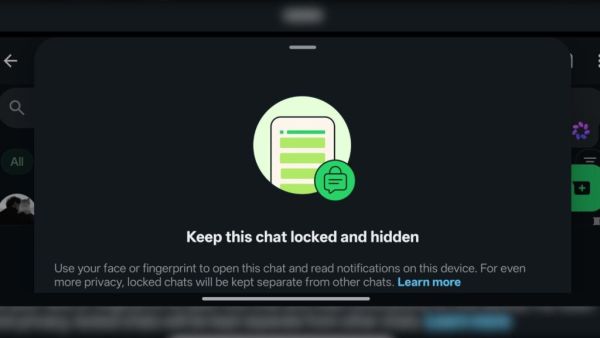
Chat Lock with secret code: Long-press any chat → Lock chat. Locked chats move to a hidden folder opened with your fingerprint or face. Go further: set a secret code (Locked chats settings), and the folder disappears entirely until you type the code into the search bar. Even someone holding your unlocked phone will not know the chats exist.
-
Disappearing messages: Per-chat timer (24 hours, 7 days, 90 days) via the contact name → Disappearing messages. A default timer for all new chats can be set in Settings → Privacy.
-
View Once photos and videos: Tap the “1” icon before sending: the media cannot be saved or forwarded, screenshots are blocked on updated mobile apps, and it vanishes after one view.
-
Silence unknown callers: Settings → Privacy → Calls: calls from numbers not in your contacts are silenced automatically, the simplest defence against scam calls, which remain rampant in India.
-
Protect IP address in calls. Same menu: relays your calls through WhatsApp’s servers so the other party cannot see your IP address (and rough location). Slight call-quality cost, real privacy gain.
-
Advanced Chat Privacy: Per-chat setting that blocks chat exports, stops auto-download of media to the gallery and prevents the chat being used in AI features, for conversations you do not want leaving the app.
-
Edit and unsend. Long-press a sent message: you have 15 minutes to edit, and about two and a half days to “Delete for everyone”.
- Read receipts and last seen, selectively: Settings → Privacy lets you hide both, and “My contacts except…” allows carving out specific people.
Lockdown, block and report: the safety toolkit
Strict Account Settings: WhatsApp’s lockdown mode. Launched in January 2026, this is the closest thing to Apple’s Lockdown Mode on WhatsApp. Settings → Privacy → Advanced → Strict Account Settings locks your account to the most restrictive posture in a few taps: media and attachments from non-contacts are blocked, interactions from unknown accounts are limited, and privacy settings are pinned to their strictest state. It is designed for journalists, activists and anyone at risk of targeted spyware, the kind delivered through a booby-trapped image from an unknown number, but any user can enable it.
Block. Open the chat → tap the contact’s name → scroll down → Block. Blocked contacts cannot call or message you and stop seeing your last seen, online status, profile photo and status updates. You can also block unknown numbers directly from the message request screen without opening the chat.
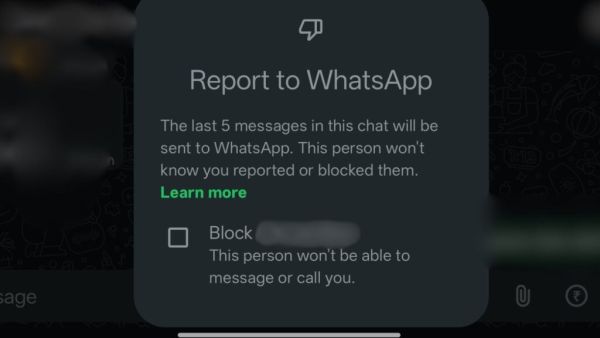
Report, and why it matters more than blocking. Long-press any specific message → Report, or report the whole account from the contact screen. Reporting sends the last five messages of the chat to WhatsApp for review; blocking alone does not. For scams, impersonation and harassment, report first, then block; it is what allows WhatsApp to ban the account. Groups can be reported the same way (Group info → Report group), and you can exit and report in one motion.
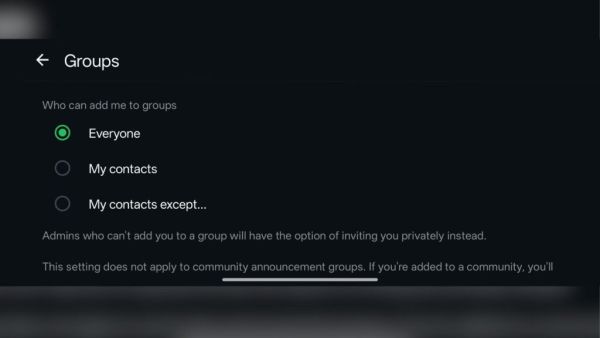
Stop strangers adding you to groups. Settings → Privacy → Groups → “My contacts except…”, the single most effective setting against the spam-group problem.
Two-step verification: Settings → Account → Two-step verification: a six-digit PIN required whenever your number is re-registered. This is the defence against SIM-swap and OTP-trick hijackings; enable it before you need it.
Privacy Checkup: Settings → Privacy → Privacy checkup walks through all of the above in one guided flow, the quickest audit if you have never done one.
-
In two months, excise dept seizes over 6,000 liter of illicit liquor

-
‘We don’t hire Muslims’ claim in Dubai job sparks backlash

-
Jharkhand student protests: CM Hemant says doors open for talks

-
Zuckerberg Apologises Over PM Modi Post Removal, Meta Admits Platform Lapses: Sources

-
Why Chelsea believe Jordan Henderson is the right signing