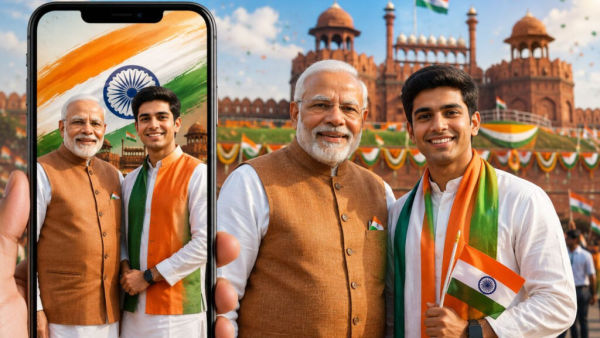
New Delhi: On 15th August i.e. Independence Day, people try different ways to make their WhatsApp status and Instagram story special. If this time you want to post such a photo of yours which looks completely different from normal photos, then the help of AI can be taken. Through the image generation feature of Google Gemini, you can prepare your photo in the theme of Independence Day and can also create a visual like a photo with Prime Minister Narendra Modi in it.
For this you will not need any photo editing software. Simply open the Gemini app on your phone, upload your photo and copy and paste one of the prompts below. In no time AI can create an Independence Day themed picture for you.
How to create Independence Day status with PM Modi on Gemini?
First of all open Gemini app in your smartphone. If the app is not present in the phone, it can be downloaded from the respective app store. It may already be available in some new Android phones. After this, tap on the '+' icon given in Gemini and select the Images option. Now again go to '+' and select Photos option and upload the photo from your gallery which you want to use in the photo to be edited or generated.
If needed, a photo can also be clicked at the same time through the Camera option. Now copy the prompt of your choice and paste it into the Gemini chat box. After this tap on the sending arrow. Gemini will create an Independence Day themed photo based on your instructions.
Prompt 1 for photo with PM Modi
Create a hyper-realistic, high-resolution portrait of a young Indian [man/woman] dressed in traditional white Kurta-Pajama with a tricolor Nehru jacket, standing respectfully beside Prime Minister Narendra Modi. The background features the historic Red Fort in Delhi decorated with Indian flags and flowers under a bright blue sky. Use soft, natural cinematic lighting, realistic facial details, lifelike textures and a professional photography look.
Prompt 2 for Independence Day Status
Create a realistic full-body photograph of an Indian [boy/girl] standing beside Prime Minister Narendra Modi. Both are respectfully holding a neatly unfolded Indian national flag together. Create a joyful Independence Day atmosphere with subtle tricolor decorations and light confetti in the background. Use natural expressions, lifelike details, realistic textures, balanced lighting and a high-quality professional photography style.
Prompt 3 for Candid Photo
Create a realistic, high-definition candid photograph showing Prime Minister Narendra Modi having a warm and inspiring interaction with a young Indian [man/woman] wearing elegant modern ethnic clothing. The background has subtle tricolor lighting and Independence Day decorations. Use natural expressions, realistic skin texture, soft lighting, depth of field and the appearance of professional portrait photography.
Prompt 4 for Cinematic Photo of Red Fort
Create a highly realistic cinematic photograph during golden hour at the historic Red Fort in Delhi. Prime Minister Narendra Modi is standing near the ramparts, wearing a white kurta-pajama and a traditional Nehru jacket with a small Indian flag pin. He is smiling warmly while looking towards the Indian national flag fluttering in the wind. Standing respectfully nearby is a young Indian man or woman in their early 20s, wearing a tricolor scarf and holding a small Indian flag. The Red Fort is decorated with marigold flowers and subtle tricolor lighting. The sky has warm orange and soft blue tones. Use natural diffused lighting, realistic facial details, lifelike textures, cinematic depth of field and professional photography quality.
Keep these things in mind while making photos
While creating photos with AI, use such a photo of yours in which the face is clearly visible. If you want the finished photo to look more natural, you can include words like realistic, natural expressions, lifelike textures in the prompt. Writing clearly in the prompt about clothes, background, lighting and mood of the photo can also help in giving better results. However, the photo created by AI is not the photo of the actual incident. Therefore, while sharing such a picture on social media, it is better to keep it clear that it is an AI-generated image. Due to this, the viewer will not have any misconception about the authenticity of the picture.