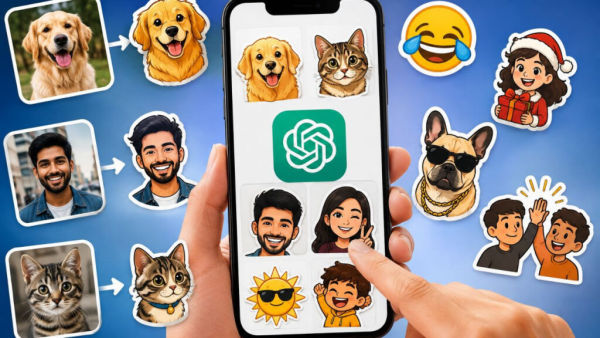
New Delhi: Now it has become easier to convert your favorite photo, a funny idea or a personal joke among friends into a sticker. OpenAI has introduced a custom sticker feature for ChatGPT. With its help, users can change their photos in different styles and can create new stickers as per their need. This feature is integrated with ChatGPT Images and can be used on web, Android and iOS.
The special thing about this feature is that users will not have to use only the already available sticker packs. They can create a new sticker from the photo of their choice. For example, a photo of your pet dog or cat can be transformed into a cartoon style. If instead of a photo, just an idea has to be converted into a sticker, then its details can also be given to ChatGPT. Funny reactions for group chat, designs to festivals or special stickers to be used among friends can be created in this way.
You will be able to make desired changes in the sticker
With the help of ChatGPT Images it is possible not only to create stickers but also to make changes in them. The user can change the expression of any character in the photo, add text or change the style as per his choice. For example, a picture of a cat may be asked to be made in such a way that it is sleeping and some funny line may be written along with it. If any part of the design is not liked, new instructions can be given to remove or change it.
Transparent background is also very useful for stickers. With this, the back portion of the image can be removed and given a clean sticker-like appearance. Such designs may be more convenient to use in messaging apps like WhatsApp and iMessage.
How to create ChatGPT stickers?
Open ChatGPT on your Android, iPhone, or web browser to create custom stickers. After this, go to the Images section given in the sidebar and select the Stickers option. Now you can upload your own photo or without a photo just write what kind of sticker you want. After this, instructions like removing background, adding text, changing expression and changing the style can be given. After the design is ready, it can be saved and shared as per need. The user can also create his own sticker pack by creating multiple stickers with the same theme and look.
Who can use it?
Users with access to ChatGPT Images can use this sticker feature. According to OpenAI, Images 2.0 is available for all tiers, while some advanced tools are gradually being released to Plus, Pro, and Business users. Therefore, it is not necessary for the feature to appear at the same time in every account.
Many options like reaction stickers, pet pictures, memes, family cartoons, festive designs and personal jokes can be created in it. In comparison to creating normal images, the focus of this feature is to create such images which can be easily used while chatting. OpenAI is also working on other features and integrations in ChatGPT during this time. These include increasing support for things like email, screenshots and files along with desktop features.
-
Swine Flu in Delhi: Swine flu cases are increasing rapidly in Delhi, when to get vaccinated? Know the answers to all the questions from the doctor

-
Onam Wishes 2026: Send 10 heart-touching Onam wishes to your loved ones, share on WhatsApp
-
Misbah Arshad reacts to Kaziah Liz Mejo's Miss Universe win

-
Do not make these mistakes while doing makeup during festivals, follow these easy tips to look beautiful.
-
Today's Rashifal: Big miracle of Tripushkar Yoga on 25th August, doors of fortune of these zodiac signs will open