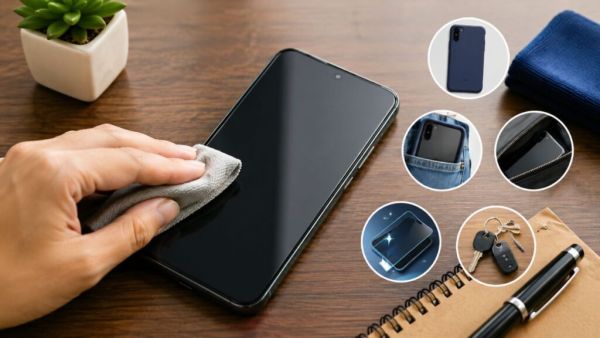
- Avoid keeping keys, coins or other sharp objects in the phone's pocket, as this may scratch the screen.
- When cleaning the screen, use a microfiber cloth to gently remove the dust first.
- Choose a good quality cover for the phone that is slightly taller than the screen.
of smartphone The craze has grown tremendously day by day. Everyone from kids to old people use smartphones according to their needs. Also buy screen protectors to protect the smartphone screen, which keeps the display safe. But did you know that you can protect your smartphone display even without using a screen protector? But for this you have to remember some smart tips. So let's find out about it now.
Social media ban for children under 16? 'This' country introduced a new bill in Parliament, 10% fine on companies for violating the rules
Do not keep sharp objects in your pocket
Scratches on the phone screen are usually caused by objects placed in the pocket. Keys, coins or any small objects can scratch the phone screen. So always remember to take out all the items from the pocket and empty the pocket before putting the phone in the pocket. Especially don't put the phone in a pocket that already contains keys, coins or other sharp objects. (Photo Courtesy – AI Created)
Many people place the phone on the table with the screen side up. If there is dust, sand, dirt particles or dirt on the table, micro scratches can occur on the screen when the phone is placed and picked up. So be careful when placing the phone on the table, otherwise the screen may get damaged.
Use the phone carefully
Even very small particles of sand and dirt can work to damage the smartphone screen. So, be careful while using the phone in beach, dusty places. Before wiping or cleaning the phone, gently blow away the dust on the screen. Without doing so, if you directly clean the smartphone screen with a strong cloth, the screen may be damaged.
Be careful when cleaning the screen
Use a microfiber cloth instead of tissue, paper or a coarse cloth to clean the smartphone screen. With the help of this you can clean the dust and fingerprints from the screen very well. Always remember that while cleaning the display, don't put too much pressure on the screen, it can damage the smartphone.
If you keep the phone in a bag or purse, don't put it in the same way as other items in the bag. Chargers, pens, keys or other objects can damage the smartphone screen. So keep the phone in a separate pocket in the bag. Be careful that no sharp object comes in contact with the smartphone.
Tech Tips: Keyboard is not just for typing! Know these amazing shortcuts that will make using computer superfast
Choose a good cover for the phone
Choosing a good cover for a smartphone is very important. Choose a cover whose corners are slightly higher than the screen. If the phone is accidentally dropped on the side of the screen, these corners greatly reduce the chance of the display hitting the ground directly.
-
Germans Swap Socialising For Screen Time In Their Free Hours

-
Club Brugge fix €50 million valuation for Germany forward Nicolò Tresoldi amid Barcelona, Roma and Manchester United interest

-
Will Julian Alvarez join Arsenal? What is known as the transfer deadline approaches
-
Zhang Ziyi reportedly earns $45M from skincare investment

-
Perez Hilton’s brother-in-law shares update on his physical and mental health