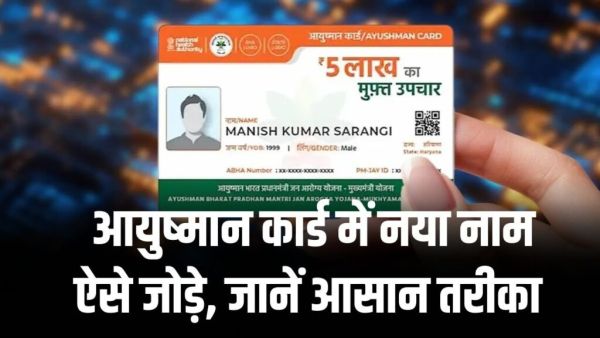
The Central Government's ambitious health scheme Ayushman Bharat Pradhan Mantri Jan Arogya Yojana (AB-PMJAY) remains a lifeline for crores of poor and middle class families of the country. Under this scheme, each eligible family is guaranteed cashless treatment up to ₹5 lakh per year in empaneled government and private hospitals. Often, when a new daughter-in-law arrives in families after marriage or after the birth of a child, the question arises that how to add the name of that new member to the already made Ayushman card of the family. The National Health Authority (NHA) has now made this process completely digital and transparent. Now you do not need to visit government offices; You can add the name of any new family member to the Ayushman card list in just a few minutes sitting at home from your smartphone or laptop. Documents Required for adding the name of a new member: Before starting the process, ensure that you have the following valid documents available: Details of the head of the family/existing member: Aadhaar card and Ayushman card number of the family member for whom Ayushman card is already made. Aadhaar card of the new member: Aadhaar card of the person whose name is to be added (note that it is mandatory to link the mobile number with Aadhaar, so that OTP verification can be done). Proof of Relationship: To add the name of the daughter-in-law after marriage: Marriage Certificate or Joint Ration Card in which the name of the daughter-in-law is recorded. To add name of new born baby or child: Birth Certificate or updated ration card. Active Mobile Number: Active mobile number for OTP Verification. Step-by-Step: How to add a new name through the official portal The process to add a name through the official beneficiary portal of the National Health Authority is as follows: Step 1: Go to the official portal First of all, open the official portal of NHA (beneficiary.nha.gov.in) in the browser of your phone or computer. Step 2: Beneficiary Login Select 'Beneficiary' option on the homepage, enter your 10 digit mobile number and click on 'Verify'. Login by entering the OTP and captcha code received on your mobile. Step 3: Search family details After login, select your state, scheme (PMJAY), district and search medium (Aadhaar Number, Family ID or Ration Card) and click on the 'Search' icon. A list of all the existing members of your family will open on the screen. Step 4: Select the 'Add Member' option On the right side of the list you will see the option of 'Add Member' (plus sign). Click on it. Step 5: Authentication of Existing Member An authentication OTP will be sent to the Aadhaar number of any existing verified member of the family for security. Enter that OTP and verify it. Step 6: Fill in the details of the new member Now a new form will open in which you have to enter the complete details of the new member: Name, Gender, Date of Birth and Father/Husband Name of the new member. Relationship with the head of the family (like Wife, Son, Daughter etc.). Enter the Aadhaar number of the new member and complete e-KYC through Aadhaar OTP. Step 7: Upload Relationship Certificate Upload the scanned copy of Marriage Certificate or Birth Certificate (in PDF or JPG format) in the Relationship Document column. Step 8: Live Photo and Submit Capture a clear live photo of the new member from mobile camera or webcam and click on 'Submit' button after checking all the details. You can also apply through Ayushman App. If you do not use a computer, you can follow the same process by downloading the official 'Ayushman App' from Google Play Store. One has to search the family ID by logging into the app in 'Beneficiary' mode and through the 'Add Member' feature, the name of the new member can be easily entered using Aadhaar FaceRD or OTP. After how many days will the card be made after name is added? After successful submission of the application, you will receive an Acknowledgment Number on the screen. Verification of your uploaded documents (Ration Card/Birth Certificate/Marriage Certificate) is done by the local health department and district nodal agency. The verification process is usually completed within 7 to 15 working days. As soon as the approval is received, the Ayushman card of the new member gets activated on the portal, which you can download in PDF format directly from the same portal or Ayushman app. If for some reason there is a technical problem in the online process, you can also visit your nearest Common Service Center (CSC Center) or Ayushman Mitra Center in any government district hospital and get the name of the new member added along with the original documents for free or at a nominal fee.
-
I am deliberately marginalised: Konda Surekha hits back post exit

-
Nepal-Tibet Flood: China warns of more glacier collapses

-
CJP protests: Gau rakshak claims Delhi Minister helped avoid jail

-
Mercedes-Benz plans to launch many more models in India: CEO

-
Nitish Rajput Bigg Boss 20 trends, meet YouTuber banned in Pakistan