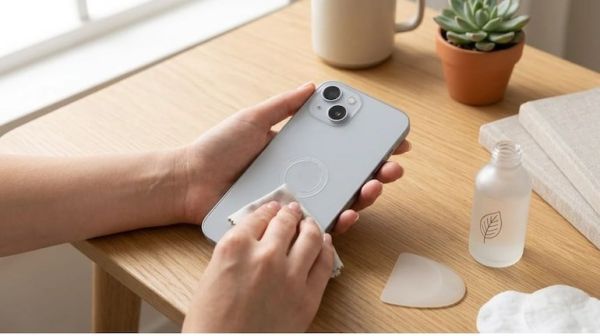
Within a few months of daily use of the smartphone, the sound of the loudspeaker often starts sounding slow, muffled or crackling. During calling, the other person's voice is not heard clearly or while playing songs, the sound feels weak even if the volume is increased to 100%. Most of the users assume that the phone's speaker is broken or damaged and they go straight to the service center, where they are charged ₹ 800 to ₹ 2,500 for speaker replacement.
The reality is that 90% of the time the speaker is absolutely right. Lint from pockets, moisture from sweat and fine dust flying in the air accumulate in the fine mesh of the speaker grill and form a hard layer. This layer prevents sound waves from coming out, due to which the sound gets suppressed. There is no need to go to any service center to get it fixed; You can clean it safely at home.
Cleaning should always be started digitally without any tools. Modern technology throws out the dust trapped in the mesh itself by the vibration of sound waves:
-
Usage of Frequency Sound Websites: in your phone's browser 'Fix My Speakers' (fixmyspeakers.com) or open the 'Blower' website.
-
Play sound: Set the phone volume to 100% and tap on the 'Water/Dust Eject' button given on the website.
-
Effect of vibration: This tool plays a special high-pitched tone ranging from 165Hz to 400Hz and ultrasonic vibrations. Due to the strong pressure of sound, the loose dust and fine particles of moisture deposited in the speaker grill are dispersed out.
-
Xiaomi/Realme In-Built Features: If you use a Xiaomi, Redmi or Realme phone, Settings > Additional Settings > Clear Speaker Turn on the feature. It clears the mesh by playing 30 seconds of loud audio.
If the dust has accumulated for a long time and is not completely cleared by sound waves, then follow these three home remedies very carefully:
-
1. Dry Soft Brush: Get a new and completely dry soft-bristle children's toothbrush. Hold the phone upside down (speaker grill facing down) so that ejected dust does not fall back in. Gently rotate the brush tip at a 45-degree angle over the grill.
-
2. Isopropyl Alcohol or Hand Sanitizer: Never use ordinary water. Just apply 1-2 drops of 99% isopropyl alcohol (rubbing alcohol) on the earbud (cotton bud). Keep in mind that the bud should only be slightly moist, not wet. Turn it lightly on the mesh. The alcohol instantly dissolves the grime and evaporates into the air within seconds without leaving any moisture behind.
-
3. Cleaning Putty or Simple Cello Tape (Blue Tack / Tape): Take a little adhesive putty (Blu Tack) or painters tape and lightly stick it on the speaker grill and pull it off immediately. The fine garbage stuck in the holes of the mesh will stick to the glue and come out.
During cleaning, many people unknowingly commit such mistakes due to which the working speaker gets damaged forever:
-
Use of needle, safety pin or SIM ejector pin: Just behind the outer mesh of the speaker is a very sensitive and thin waterproof diaphragm membrane. By inserting the pin, that membrane bursts, after which the sound of the speaker will become hoarse for life.
-
High-pressure air blower or vacuum cleaner: The highly pressurized air pushes the dust deeper into the speaker's internal coil or agitates the coil rather than expelling it.
-
Hot air from blow dryer: The hot air from a hair dryer may melt the waterproof glue holding the speaker grill in place and burn the internal components.
If the sound does not improve even after cleaning the entire grill using all the methods mentioned above, it could be a hardware malfunction. Pay attention to these symptoms:
-
Constant whirring or electronic 'buzzing' sound coming from the speaker when the volume is increased.
-
No sound at all from the speaker (Dead Speaker).
-
Short-circuit due to phone falling in water or placing it in a heater.
In such a situation, do not try too hard and go to the authorized service center and get the hardware diagnostics done. But if the problem is just low sound, then in 99% of the cases this home cleaning will make your phone sound as loud as new again.
| cleaning method | security level | Who is it best for? |
| Fix My Speakers (Sound Wave) | 100% safe (no touching) | To remove moisture, water droplets and light dust |
| soft toothbrush (dry) | extremely safe | Dried lint and dust particles stuck to the grill |
| Isopropyl Alcohol + Bud | safe (gently) | To dissolve stubborn grime of sweat and oil |
| insert a pin or needle | extremely dangerous (restricted) | Risk of diaphragm rupture and speaker damage |
-
Apple's First Foldable, iPhone 18 Pro Series To Launch In India Today: Here's How To Watch The Event
-
OpenAI Claims 'Internal AI Model' Just Cracked A $1 Million Math Mystery That Was Unresolved For 90 Years: Mathematicians Raise Fears

-
'It Could Kill Us All By The End Of The Decade': Anthropic Researcher Jacob Coxon Quits Over 'Out of Control' AI Fears

-
Satya Niketan Building Collapse: PG Operator Sudhanshu Arrested, Two New Names Emerge In Delhi Police Probe

-
Supreme Court Refuses To Cancel Assistant Professor’s Appointment Despite Doubt Over Ph.D.; Orders Fresh Probe Into Degree