pc:tv9hindi
If you've noticed that photos and videos received on WhatsApp are automatically saved to your phone's gallery, causing storage issues, don't worry! To solve this problem you can change an Easy setting.
When your phone's storage fills up, it can cause performance issues and even cause your phone to hang. It is more frustrating when your phone hangs repeatedly while using it but WhatsApp users do not know how to stop photos and videos from getting saved on their phones.
WhatsApp users have two options to prevent photos and videos from being saved on their phones. First, you need to decide whether you want to apply this change to all chats or just to specific chats, as both options are available within the WhatsApp application.

pc:tv9hindi
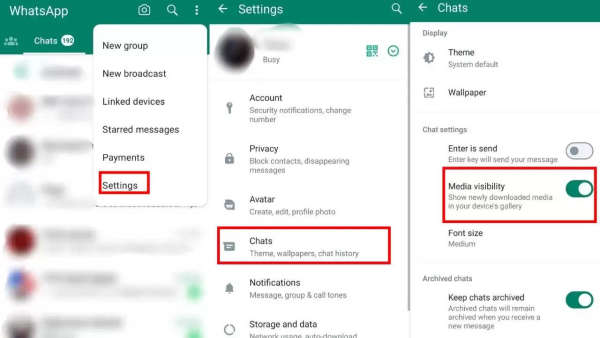
If you want to stop all incoming photos and videos from being saved to your phone, follow these steps:
- Open WhatsApp and tap on the three dots in the top right corner to access Settings.
- Tap "Settings" and then select "Chats."
- Turn off the "Media Visibility" option.
pc:tv9hindi
If you want to apply this setting only to a specific chat, follow these steps:
- Open the chat for which you want to change the settings.
- Tap on the three dots in the top right corner to access the options.
- Select "View Contact".
- Turn off the "Media Visibility" option.
-
CWG 2026: Neeraj Chopra chases gold; 10 boxers assured of medals

-
Mountaineer Nirmal Purja feared missing after avalanche on Broad Peak
-
Mastercard Q2 net income soars 19% to $4.4 billion, revenue up 14%

-
Arm’s Q1 revenue surges 22% to a record $1.289B on strong AI demand

-
HIMS Stock Eyes 4-Week Losing Streak: Legal Woes Fuel ‘Very High’ Uncertainty As Analyst Sticks To ‘No Moat’ Call