

pc:tv9hindi
WhatsApp has introduced a number of features for users on the world's most widely used instant messaging app. Today we are going to tell you about a secret feature that helps in saving mobile data during WhatsApp calls.
The name of this feature of WhatsApp is "Use Fewer Data For Calls". Many people may not be aware of this feature, so let us know how you can turn on this feature in WhatsApp settings.

pc:tv9hindi
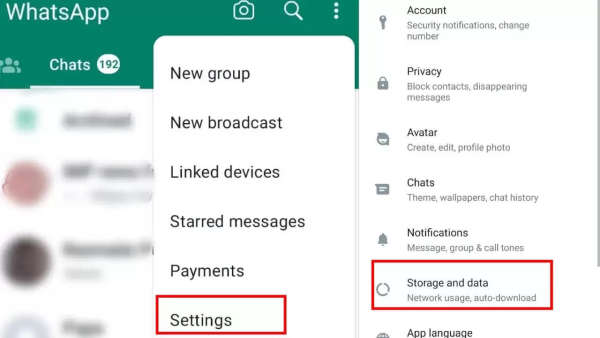
First of all, you have to open WhatsApp on your phone. After opening the app, you have to click on the three dots on the top right side. As soon as you tap on the three-dot icon, you will see some options. Out of these, you have to click on the “Settings” option.
Once you click on WhatsApp Settings you will again see several options, but don't get confused. You need to tap on the “Storage & Data” option.
pc:tv9hindi
After clicking on the Storage and Data option, you have to click on "Use less data for calls". After clicking this option, the next time you make a WhatsApp call, your mobile data will cost less than before.
-
Sawan 2026: From king to monk, these 10 amazing PICS of Mahadev created by AI will fascinate your mind

-
AMFN Stock In Focus: Retail Bets Grow As American Fusion Enters Key Testing Phase With Texatron Milestone

-
Entry of ‘New Singham’ in Mumbai? Action on 100 restaurants, Maharashtra FDA Chief’s decision shocked! | Maharashtra Fda Food Safety Drive Tukaram Munde Mumbai Restaurants License Suspension Fssai

-
Akhilesh Yadav lashed out at BJP, said – theft in donations was a big sin and crime. Akhilesh Yadav Accuses BJP Of Grave Sin Of Betraying Faith Over Donations

-
Mumbai Indians got a new offer, these two star players are ready to give to Delhi in exchange of Hardik Pandya. Hardik Pandya Trade News Delhi Capitals Vs Csk Mumbai Indians Axar Patel Prithvi Shaw Ipl Transfer Rumors