

Not just one but many great features have been provided in WhatsApp for the privacy and safety of the users. Do you know that there is a feature in WhatsApp which can give you information whether your account is being used by someone else? (symbolic picture)

To find this out you just have to follow some simple steps. First of all open the WhatsApp app in your smartphone. (symbolic picture)
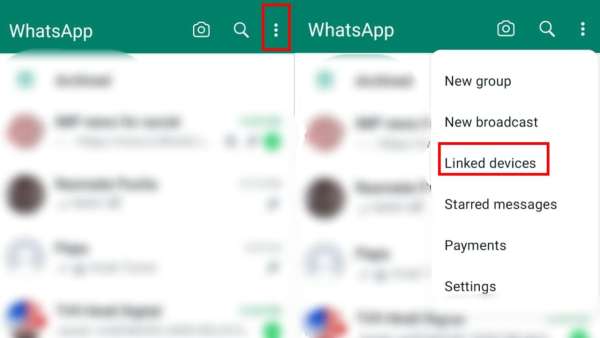
After opening the WhatsApp app, you will have to click on the three dots visible at the top of the ride site. After clicking on the three dots, you will see many options but you will have to click on the Linked Devices option. (Photo credit- WhatsApp app)
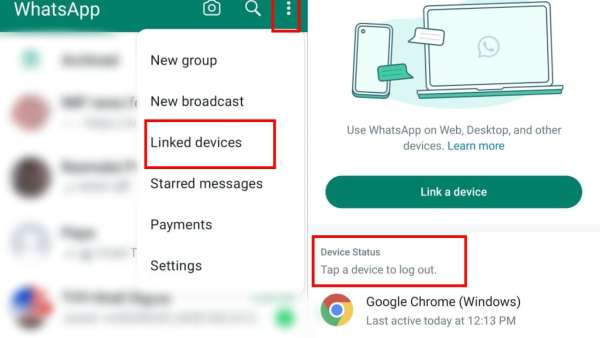
As soon as you click on the Linked Devices option, you will get the Link a Device option. Apart from this, Device Status will be written, here you will see the names of all the devices on which your WhatsApp account is running. (Photo credit- WhatsApp app)
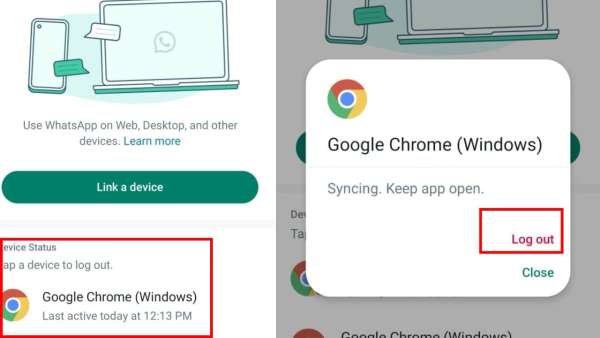
Whichever device you want to log out from, just click on the name of that device, you will see the log-out option. As soon as you click on Log-out, your account will be logged out from that device. (Photo credit- WhatsApp app)
-
Skip the expensive beauty products! Almond oil will provide glowing skin and thick hair, also relief from cracked heels

-
Impact on the abusive boss and his team

-
Is your home’s RO (rozen-free) water making you sick? Learn the right way to purify water and expert advice

-
Amazon Great Freedom Sale 2026 announced, mega sale will start from August 7, big discounts from smartphones to laptops

-
Rainfall record will be broken in these 23 states in the next 24 hours, big warning from meteorological department