

WhatsApp is one such instant messaging app which is most used all over the world. The company keeps working on new WhatsApp features for the best experience of the users. At present, not just one or two but many features have been provided in the app for the convenience of the users, one of these useful features is WhatsApp Number Change.
This feature comes in handy when your old number changes or you start living in another country. Apart from this, there can be many other reasons due to which the thought of changing WhatsApp number comes in the mind of people.
Today we will give you information about two important questions, the first important question is what is the method of changing WhatsApp number? And the second important question is, can WhatsApp chat disappear while changing the WhatsApp account number?
How to Change WhatsApp Number: Let's know the answer to the first question?
To change the number of WhatsApp account, first of all open your WhatsApp account. After opening the app, click on the three dots on the top right side, here you will have to tap on the Settings option.
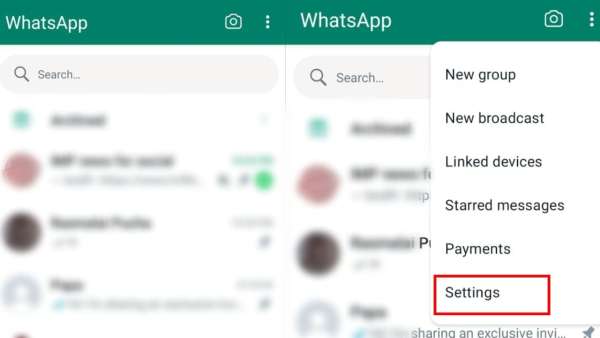
whatsapp tips
As soon as you click on the Settings option, you will start seeing not just one but many options. Among these options, you will first have to click on the option Account.
After tapping on the account option, you will see the Change Number option, click on this option. After clicking on change number, tap on the Next button in the next step.
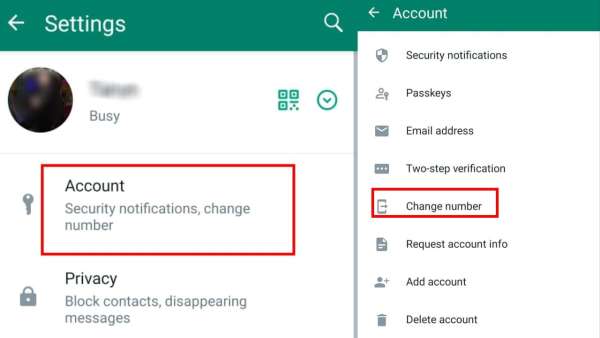
whatsapp tips and tricks
As soon as you tap on the Next button, you will be asked to enter the old number from which your WhatsApp account is currently running. After entering the old number, you will have to enter the new phone number. After entering both the numbers, you will see Next written at the bottom of the screen, tap on this option.
After entering the old and new numbers and pressing Next, you will see it written on the next screen that you are switching from the old number to the new number. There are many people who want to give this information to their contacts.
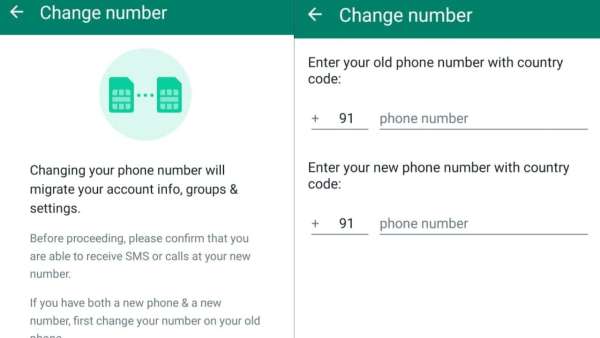
Change WhatsApp number like this
Such users will see the option of Notify Contacts here which is closed, you should turn it on. If you do not want any of your contacts to know about this, then leave this option closed.
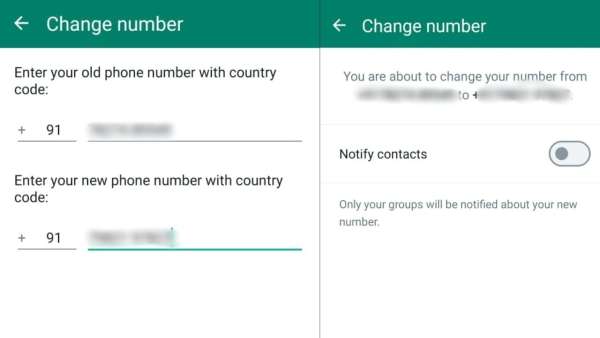
Process to change WhatsApp number
One thing to be noted here is that your WhatsApp contacts will not know about this, but all the groups in which you are connected will definitely be notified that your number has changed.
Second question: Will changing the number spoil the chat?
While changing the number of WhatsApp account, many people have this confusion in their mind that we are changing the number but our important chats might get lost due to this. For your information, let us tell you that when you change your account number using this important feature of WhatsApp, then your important chats do not get lost.
Although your WhatsApp chats will not be deleted, it is still advisable to take a backup of your chats before doing this process.
-
Sunday church trips spark conversion row at Telangana school

-
Rohith Nara plays a hearing-impaired Sound Engineer in next film

-
'Jana Nayagan' box office collections day 3: Thalapathy Vijay and Pooja Hegde's film jumps 34.8%; crosses Rs 92.35 Cr India Net

-
Ryan Gosling joins MCU as Ghost Rider for upcoming film: 'This is a character I've wanted to play for a long time'

-
Jennifer Connelly quips about being confused with Demi Moore: 'I've gotten people insisting'