

Have you also bought a new smartphone? But you are not able to understand how to transfer the WhatsApp Chats from the old phone to the new phone? So today we are going to tell you a very simple method.
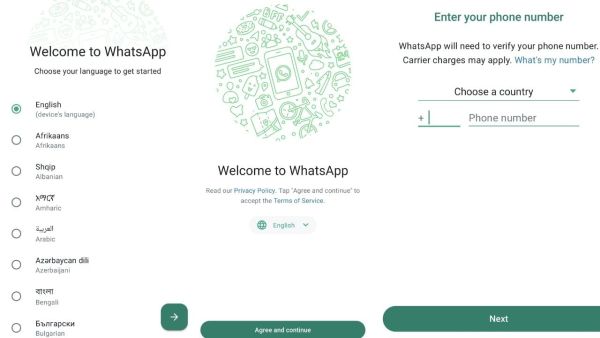
First of all, you have to install WhatsApp in your new smartphone, after this, as soon as you open the app, you will see three dots on the top right side of the screen.
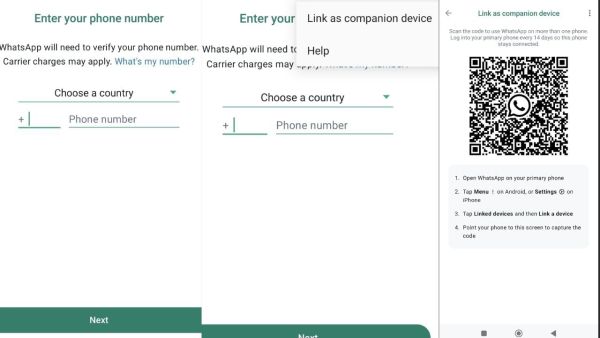
As soon as you click on the three dots, you will see the Link a Device option. You have to click on this option of Link Device, as soon as you click on this option you will see the QR Code.

After this, you will have to open WhatsApp in your old smartphone, after opening WhatsApp, click on the three dots visible on the top right side.

After clicking on the three dots, you will see the Link Device option, as soon as you click on this option, the camera of your old phone will open. After the camera opens, scan the QR Code shown in the new phone. As soon as the code is scanned, your work will be done and you will start seeing all the chats of the old phone in the new phone.
-
‘We always knew we were stronger than England’ – Lionel Messi admits fearing ‘foolish’ backlash if Argentina had fallen short in World Cup semi-final

-
Why America's hospitals keep looking to India for nurses

-
SC refuses to hear contempt pleas alleging violation of 2024 'bulldozer' guidelines

-
Third language should be introduced in Class 6, not Class 9, says Supreme Court on CBSE policy

-
Why ISRO's reported scientist exodus is about more than just numbers