The blue icon on WhatsApp and Instagram is nothing but Artificial Intelligence Service. This AI facility has been provided for the convenience of the users. Meta works on some update every day for the convenience of its users and if they pass the testing, it launches them for the users. This ring icon has been given for your convenience only. But read below to know how to use it and what will be the benefit of it.
Meta AI icon?
As mentioned above, this blue ring icon is an artificial intelligence service, so you can do a lot with it. Through this, you can solve many of your problems. You can get answers to any question on it, not only this, you can also generate photos on it.
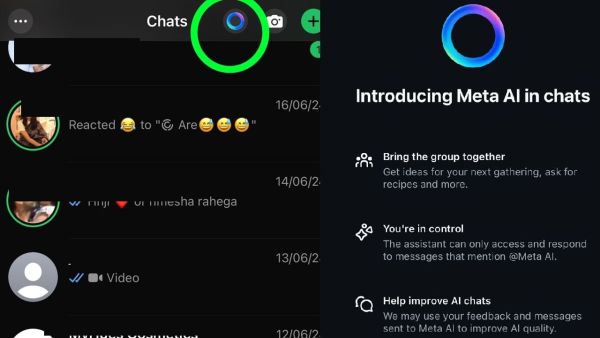
Meta Ai Ring On Instagram And WhatsApp
In this, you can generate any kind of photo you want. For this, you just have to write the prompt in the chatbox and send it. The AI will read your prompt and generate that image for you. If the Meta AI is unable to understand that image, then it sends you a message that it cannot generate this photo.
How to use
For this, you just have to click on this ring icon. After this, you have to allow it, now the chat will open in front of you like a normal chat box. Here you can write the question you want to ask and you can also write the prompt for the photo you want to generate. On this, you have to write your prompt in fewer words so that the AI can read it and you get the photo you want to make.
this will be beneficial
You can also ask for the recipe of the dish you want to make. It sends you many easy recipes in writing which you can choose according to your choice. After this feature, you will not have to take the help of any separate AI platform. This will also save your subscription cost. You can generate photos and get answers to your questions on Instagram and WhatsApp itself.
If you have not received this update yet, then update your app. Even after this, if it does not show up, then wait for a few days, soon you will also be able to use this service.
-
Lamine Yamal vs Kylian Mbappe at 19: A Statistical Comparison Every Barcelona Supporter Should Know
-
Draft final probe report in Ahmedabad plane crash to be ready in October: AAIB to SC

-
'Shaheedi' memorial to be built at Harike Pattan, says Akal Takht Jathedar amid 'Satluj' row

-
Kobbie Mainoo’s World Cup role under scrutiny as Manchester United midfielder remains unused by England
-
Atalanta Shocked by Manchester United’s Withdrawal from Ederson Deal, Begin Talks for New Contract