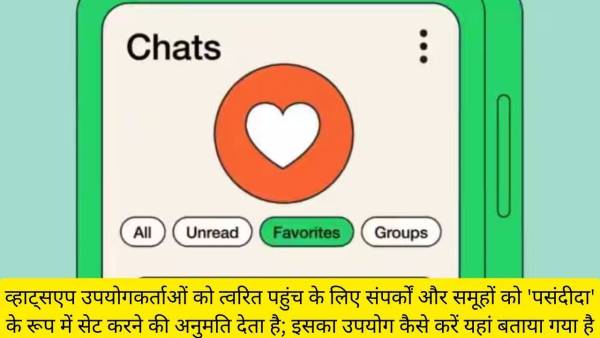
PIONEER News HARYANA : Meta-owned WhatsApp has rolled out a new feature for users to easily find people and groups that are important to them. The new feature allows users to add contacts and groups as favourites, allowing them to filter through chats more quickly.
Apart from this, the favorite filter has also been extended to the calls tab on WhatsApp so that users can speed-dial their family or friends. However, the company said that the new feature will be released for all users in the coming weeks.
The newly launched feature acts as an additional chat filter, hiding all conversations except those added as favourites. Chat filters were introduced in April this year, enabling users to view all messages, filter out unread messages, or display only group chats.
Currently, there is no official word on whether the 'Favorites' filter will reach the desktop and browser versions of the popular instant messaging platform.
How to set contacts and groups as 'Favorites' for easy access on WhatsApp
Step 1: Open WhatsApp and go to your Chats screen. Find and select the 'Favorites' filter to manage your favorite contacts or groups.
Step 2: Go to the Calls tab in WhatsApp. Tap on the 'Add Favorites' option to start adding the contacts or groups you want.
Step 3: From the list, select the contact or group you want to add to your favorites.
Step 4: Go to WhatsApp Settings by tapping the three-dot menu (⋮) at the top right corner of the screen.
Step 5: Go to Settings > Favorites > Add to Favorites. Confirm your selection to add your contacts or groups to your favorites list.
Earlier, WhatsApp introduced a new update for both Android and iOS users. This update allows users to forward photos with captions and enhances poll functionality. This update is available for download from Google Play Store and Apple App Store.
-
Paris landmarks close early as France faces heatwave

-
If you are also having stomach ache during monsoon, then it could be food poisoning!

-
5 Zodiac Signs Experiencing The Best Horoscopes All Week, From July 13 – 19, 2026

-
Is A Roku Still Worth Buying In 2026?

-
Florida ransomware negotiator convicted for helping ransomware gang extort US companies