
Instant messaging app WhatsApp is very popular all over the world, millions of users are active on the app every day. This is the reason why hackers or rather scammers have started taking the help of WhatsApp to cheat people. Ever since the 'blue sphere' of WhatsApp Meta AI has come in the app, everyone is talking about this feature, but more than this feature, you need to know how you can keep your account safe from fraudsters.
Not only WhatsApp Meta AI is provided for you in the app, but the company has also provided many safety features about which you should be aware. Let us know which safety features are there in the app which you should turn on immediately?
WhatsApp Safety Features: These are useful features
WhatsApp Two Step Verification: WhatsApp has a two-step verification feature for the safety of users. To turn on this feature, you have to open WhatsApp, then tap on the three dots on the right side and go to Settings.
In the settings, you will find the two-step verification feature in the account option. To turn on this feature, you will first have to create a 6-digit PIN and then enter the email ID so that if you ever forget your PIN, you can reset the PIN with the help of the email ID. If someone tries to register again on WhatsApp with your number, then that person will first have to enter this 6-digit PIN.
WhatsApp Protect IP Address in Calls: You must be using WhatsApp calls but to ensure that no one can trace your location through calls, you should turn on this feature now.
The advantage of turning on this feature is that your calls will go through the WhatsApp server and no one will be able to find out your location by tracking your IP address through the calls. To turn on this feature, click on the Advanced option at the bottom of the Privacy option in WhatsApp settings.
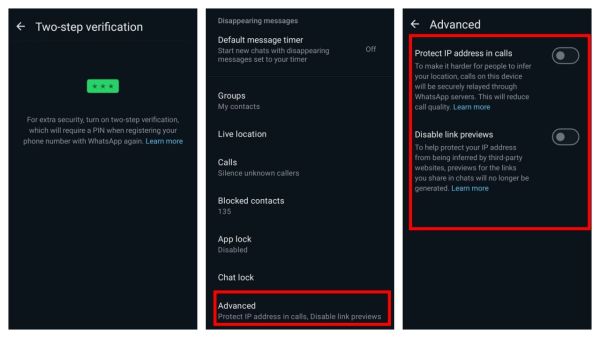
(Photo Credit- WhatsApp App)
WhatsApp Disable Link Previews: Turn on this feature to protect your IP address from third party websites. After turning on this feature, previews of any links you share in the chat will not be generated. You will find this feature in the Advanced option in the Privacy section in WhatsApp settings.
-
Pakistan Deploys 17,500 Troops Ahead Of Muzaffarabad March As PoK Death Toll Rises To 62

-
UK police arrest murder suspect in Ann Widdecombe's death

-
EPF Rule Changes 2026: How the New EPFO Reforms Will Benefit PF Members

-
8th Pay Commission: Railway Engineers Seek Major Salary and Promotion Reforms

-
Earning Well but Still Running Out of Money? Avoid These 6 Common Personal Finance Mistakes