
Everyone is worried about the privacy of WhatsApp Account, but do you know that the company has already made arrangements for this? New WhatsApp features keep getting added to the app, but there are many people who are not aware of many features given in the app. Some time ago, WhatsApp Meta AI feature was added to the app, everyone is using this feature extensively, but more important than this feature is the use of privacy features given in the app.
Today we are going to tell you about five such WhatsApp Privacy Features that every user should know. If you do not know these five features, it means that the privacy of your account is at risk and anyone can see the information related to your account.
WhatsApp Privacy Settings: Change these 5 settings immediately
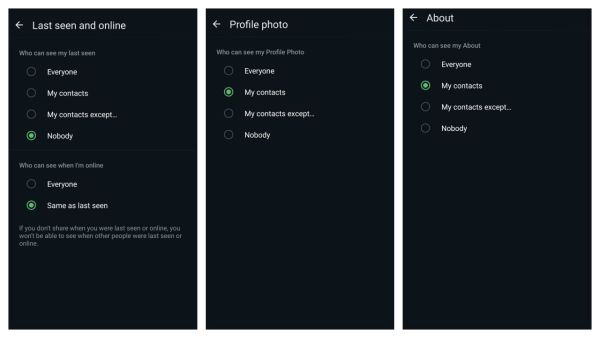
First setting: First of all change the Last Seen and Online settings, if you want that no unknown person should know when you were last online or whether you are online right now, then go to Privacy in WhatsApp settings and click on the Last Seen and Online option. Here you have to click on My Contacts or Nobody option.
Second setting: The second important feature is Profile Photo, if you want that no unknown person can see your profile photo, then for this you have to click on the profile photo option in the privacy section in WhatsApp settings. After this, you tap on Nobody or My Contacts option.
Third setting: The third important feature is About. Whatever information you have entered about yourself on WhatsApp, if you want that no one can see that information, then click on About in the Privacy section in WhatsApp settings. After this, you can choose any option from My Contacts or Nobody.
(Photo Credit- WhatsApp App)
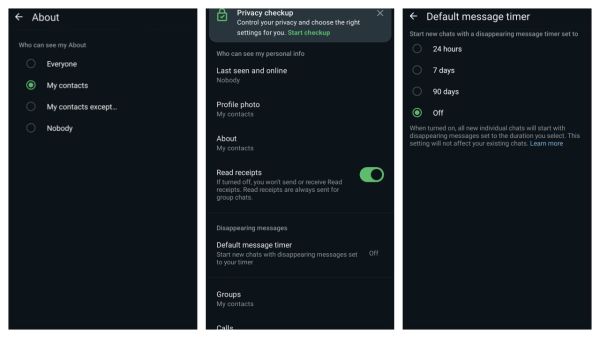
Fourth setting: When you send a message to someone or someone sends a message to you, they get a blue tick to indicate that you have read the message. But if you do not want anyone to know that you have read the message, then turn off the Read Receipts option in the Privacy section in WhatsApp settings.
Fifth setting: The fifth and last most important feature is Disappearing Messages. If you want the message you are sending to disappear from the other person's chat after some time, then for this you will have to click on the Disappearing Messages option in the Privacy section of WhatsApp Settings.
(Photo Credit- WhatsApp App)
After this, you can choose any option from 24 hours, 7 days or 90 days. Whichever option you choose, the message will disappear from the other person's chatbox at the time specified by you and your privacy will be maintained.
-
Newcastle United reach agreement in principle on £50m deal for Swiss World Cup standout Johan Manzambi

-
Not till I am alive: Kavitha rules out returning to BRS

-
Bangladesh steps up bid to bring Sheikh Hasina back

-
Attapur Police arrest 5 in MDMA, psychotropic drugs case
-
Shreyas Iyer Rescues India From Collapse! England Need 159 To Seal T20I Series