

WhatsApp has become very important in today's time, which includes sharing photos, videos, and documents along with messaging and calling. Now so much information lives together in one place, so it is very important to keep a backup. If you are planning to change the device, then it is even more important. Backing up your chat history is easy. You will need a Google account to store your backup in the cloud. If you find this process difficult, then you do not need to worry, because here we are telling you in detail about the step-by-step process to back up WhatsApp data.
How to backup data on WhatsApp:
First of all, you have to open WhatsApp on your phone.
After that, you have to go to Settings.
After going to Settings, you have to go to the Chat section.
Now you have to tap on Chat Backup.
Now you have to click on Chat Backing Up, here you can select your Google account, where you want the backup.
After doing this, now your chat has started uploading to the cloud. After the backup is complete, you can log in to your WhatsApp account on the device you are switching to. Here you will find the option Search for Backup and then tap on Restore Backup. After all this is done, your entire chat history including media files has been restored on your new device.
-
Is Real Madrid quietly wishing for Vinicius Junior to struggle at the World Cup? The tension surrounding the Brazilian star intensifies

-
BBL: Andrew Flintoff Named Sydney Thunder Head Coach, Returns To League After Playing Stint

-
Apple WWDC 2026 Teased With Tagline ‘All Systems Glow’: Siri Overhaul, AI Features Expected

-
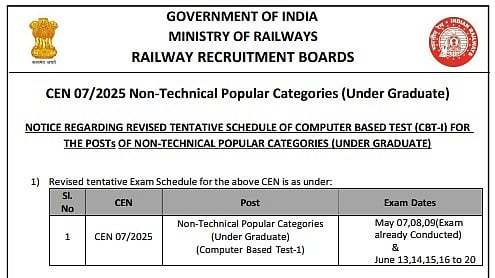
RRB NTPC Undergraduate CBT 1 Exam 2026 To Begin On June 13; Check The Official Notice Here
-
Quiz! Can you list every team that has ever won the English league title?