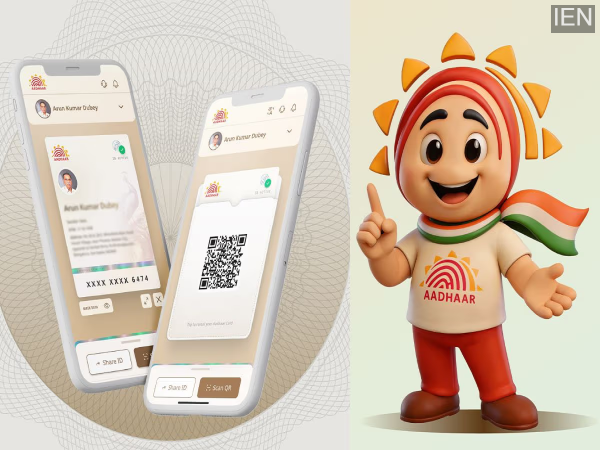
Aadhaar App Features: UIDAI has launched a new Aadhaar app, making it easier to change your mobile number and address. Aadhaar users will no longer need to carry photocopies of their Aadhaar card everywhere, as all verification tasks can now be done through the app.
Aadhaar App Features: If you find it inconvenient to carry photocopies of your Aadhaar card everywhere or visit a center repeatedly for Aadhaar updates, then your troubles are over. UIDAI has launched a new Aadhaar app that allows you to perform many Aadhaar-related tasks from your mobile phone. UIDAI states that people still share photocopies of their Aadhaar for hotel, SIM card, or office verification, which poses a risk of data misuse. The new app aims to mitigate this problem. Let's explore the features of this new app.
Benefits of the new Aadhaar app
This app makes Aadhaar more secure and convenient. It offers features like offline Aadhaar verification, selective sharing of information, and updating mobile number or address. Users will no longer need to share their Aadhaar number or biometric information.
How to set up the Aadhaar app
The Aadhaar app is available on the Google Play Store and Apple App Store. Android users can download the app from the Google Play Store, and iPhone users can download it from the Apple App Store. Upon opening the downloaded app, you will be asked for access to your location, contacts, camera, and SMS. After accepting these permissions, you will get the option to register. First, you will need to enter your Aadhaar number, then select your SIM for SMS verification. After that, you will need to scan your face for face authentication. Once this is done, your registration will be complete.
How offline Aadhaar verification works
The best feature of this app is offline verification. It doesn't require an internet connection, and users don't have to share all their information. It provides options for Share ID and QR code scanning. The Share ID feature creates a password-protected file that shares only essential details such as name or age. Meanwhile, verification can be done instantly by scanning the QR code displayed by the other party.
How to Update Mobile Number and Address
The most convenient feature for users is that they can now easily update their Aadhaar-linked mobile number and address through the app. To do this:
- Open the Aadhaar app and log in.
- Then, select the ‘Update Aadhaar details’ option on the home screen.
- Next, select the option to update your mobile number or address.
- Fill in the new details and click on the submit option.
- Complete the authentication process as instructed in the app.
- A small fee will be charged for this service.
- After verification, the details will be updated in your Aadhaar record.
Other Features of the Aadhaar App
This app also offers several other useful features, such as:
- The option to create up to 5 Aadhaar profiles on one phone.
- Easy management of Aadhaar for children or dependents in the family.
- The Aadhaar Contact Card feature, which allows limited information to be shared securely.
UIDAI's New Rule
UIDAI has also implemented a new rule. Under this rule, any institution or organization that wants to perform offline Aadhaar verification must first register their institution or organization with the government. This will ensure that only authorized banks, hotels, and service providers can perform Aadhaar verification.
-
'Absolute perfect' period drama with a 'fresh' twist is now streaming on BBC iPlayer

-
Orry calls Ibrahim Ali Khan 'besharam', sparks new fight

-
Morrisons makes major change affecting 1,700 of its stores for next 2 weeks

-
Why do you see the same ads on Instagram that you've been thinking about? Learn the reasons and easy ways to avoid it

-
Suresh Raina Supports Vande Mataram CISF Cyclothon 2026