The demand for 3D content continues to grow across industries such as gaming, digital media, product design, and education. However, creating usable 3D assets still requires time, experience, and familiarity with complex 3D software. For many teams, the challenge is not creativity but efficiency—turning ideas, references, or early concepts into workable models without slowing down production. Tripo Studio enters this space as an AI 3D model generator designed to reduce friction in the early and middle stages of 3D creation. Rather than positioning itself as a replacement for professional tools, Tripo Studio focuses on accelerating workflows by automating repetitive technical steps while leaving creative control in the hands of users.
What Is Tripo Studio?
Tripo Studio is an AI-powered platform built to simplify how 3D models are created from visual or textual inputs. At its core, it functions as an AI 3D model generator that supports both image-to-3D and text-to-3D generation, allowing creators to move from concept to 3D structure more efficiently. The platform is designed to fit into existing pipelines rather than forcing users to abandon familiar tools.
Instead of starting from an empty scene, users can generate a base model that already contains coherent structure, surface detail, and organization. This approach is particularly useful for creators who need speed during ideation, prototyping, or early production. By combining generation, optimization, and preparation features, Tripo Studio reduces the gap between raw ideas and usable assets.
Importantly, Tripo Studio does not attempt to automate creativity itself. The AI handles interpretation, structure, and technical groundwork, while users remain responsible for refinement, artistic decisions, and final output. This balance makes Tripo Studio relevant not only to beginners, but also to experienced professionals looking for a faster starting point in their workflows.
Key Features of Tripo Studio
Image to 3D Model: Turning Visual References into Assets
The Image to 3D Model feature allows users to generate a 3D asset from one or multiple images. This is especially useful when working with sketches, concept art, or photographic references. Instead of manually reconstructing forms, Tripo Studio analyzes the visual input and produces a structured base mesh that reflects overall shape and proportion.
This workflow is valuable in scenarios that require moving from 2D to 3D efficiently, such as concept validation or early asset blocking. As an AI 3D model generator, Tripo Studio helps users reduce the time spent on initial geometry, allowing them to focus more on refinement and creative adjustments rather than manual reconstruction. It also supports multi-view input for higher accuracy and batch generation for up to 10 images at once.
Text to 3D Model: From Description to Structure
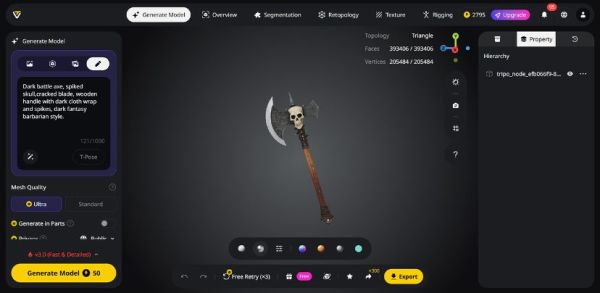
Text to 3D Model enables users to generate 3D objects based on written descriptions. By interpreting natural language prompts, the system produces models that reflect the described form and characteristics. This feature demonstrates how an AI 3D model generator from text can support early-stage ideation when visual references are limited or still evolving.
Rather than aiming for final production quality, text-based generation is most effective for exploration. Users can test variations quickly, compare outputs, and refine descriptions to explore different design directions. Within an AI 3D model generator workflow, this feature serves as a creative tool for brainstorming and rapid iteration.
Intelligent Segmentation: Editing with Precision
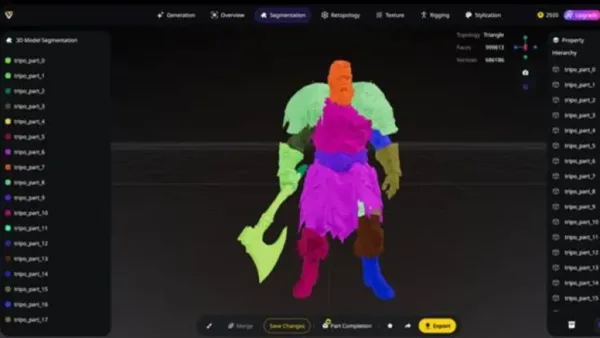
Intelligent segmentation focuses on dividing a model into meaningful parts. Instead of delivering a single, unstructured mesh, Tripo Studio identifies logical components and separates them accordingly. This includes preserving topology and structure for each component, making them ready for editing, material assignment, or animation.
Segmentation is especially useful for downstream tasks such as material assignment, animation preparation, or partial redesign. By integrating this capability directly into the AI 3D model generator, Tripo Studio helps bridge the gap between automated generation and hands-on control, making AI-generated assets more practical for real workflows.
Smart Retopology: Cleaner Meshes for Production
Topology plays a critical role in how a 3D model performs across different environments. Tripo Studio’s Smart Retopology feature automatically restructures generated meshes into cleaner, more efficient geometry. This process reduces unnecessary complexity while preserving essential shape and detail.
For creators working with an AI 3D model generator, retopology is a key step in turning experimental outputs into usable assets. Clean topology improves editability, animation readiness, and performance in real-time applications, making models easier to integrate into professional pipelines.
AI Texturing: Consistent Surface Detail
AI Texturing applies coherent surface details to generated models based on their geometry and context. It creates PBR-ready materials directly from text or reference images, and includes a Magic Brush for localized, real-time adjustments.
This feature supports faster iteration, particularly during prototyping and visualization. Within an AI 3D model generator workflow, automated texturing helps maintain visual consistency while reducing repetitive manual work. It allows creators to focus more on design decisions rather than technical setup. High-resolution textures are upscaled automatically, preserving surface detail and realism.
AI Auto Rigging: Preparing Models for Motion
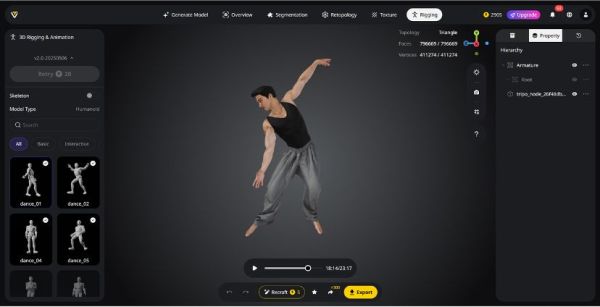
Rigging is often one of the most technically demanding steps in character creation. Tripo Studio’s AI Auto Rigging feature simplifies this process by generating a basic skeletal structure automatically. It analyzes the model’s geometry, applies balanced skin weights, and produces a rig suitable for immediate pose testing or animation.
While advanced animation still benefits from manual refinement, auto rigging significantly speeds up early testing. A library of over 100 motion-capture-quality animations is available for instant preview, and a Lock Frame feature allows exporting specific poses as standalone models for variations or 3D printing.
Model Stylization: Adapting Visual Style
Model stylization provides users with options to adapt the visual tone of generated models. Users can transform models into different artistic styles, such as voxel patterns, without having to rebuild the original geometry. By including stylization within the AI 3D model generator pipeline, Tripo Studio supports diverse creative directions while keeping workflows consistent and flexible.
Real-World Applications of Tripo Studio
Tripo Studio is designed to support practical use cases across different industries. In game development, teams can generate early-stage assets to test scale, composition, and gameplay flow. These placeholder models help designers iterate faster before committing resources to final production.
In product visualization and concept design, Tripo Studio enables designers to convert ideas into 3D representations for internal reviews or presentations. This reduces the time needed to communicate concepts across teams and stakeholders. Educational users also benefit from Tripo Studio as a learning-oriented AI 3D model generator, where experimentation and rapid feedback are more important than perfect output.
Some creators explore Tripo Studio as an AI 3D model generator free option during early experimentation, using it to understand workflows before integrating it into more advanced pipelines. The platform also supports early validation for projects to visualization and conceptual 3D AI generator use cases, where speed and flexibility matter more than final polish.
Overall, Tripo Studio is most effective in scenarios where rapid iteration, exploration, and preparation are key priorities.
The Tripo Community
Beyond its technical capabilities, Tripo Studio is supported by an active community of creators. Users share generated models, workflow experiments, and practical insights, helping others understand how to integrate AI-assisted generation into real projects.
This community-driven environment encourages learning through observation and iteration. By seeing how others apply features like segmentation or retopology, new users gain a clearer understanding of how an AI 3D model generator fits into professional workflows. The shared gallery of models also highlights diverse use cases, reinforcing Tripo Studio’s role as a flexible tool rather than a one-size-fits-all solution.
Conclusion
Tripo Studio represents a practical approach to AI-assisted 3D creation. By focusing on automation where it adds real value—generation, organization, and preparation—it reduces technical friction without oversimplifying the creative process. As an AI 3D model generator, it provides faster entry points into 3D workflows while preserving user control.
For creators seeking efficiency rather than shortcuts, Tripo Studio offers a balanced solution. It supports experimentation, accelerates iteration, and integrates smoothly with existing tools, making it a relevant option for modern 3D production environments.

-
CTET 2026 Results Likely in March: Answer Key Expected Soon, Here’s the Complete Timeline

-
Supreme Court Pulls Up Banks Over Rising Digital Fraud, Seeks Answers from RBI on Policy Gaps

-
High-Return Trap Costs Dear: Retired Banker Loses ₹1.10 Crore in Sophisticated Online Investment Scam

-
Ferrari Luce EV Interior Designed By Apple iPhone Creator Jony Ive

-
IND Vs PAK Boycott Row: Pakistan's Solidarity For Bangladesh Stance Busted As BCB Requests PCB To Play T20 World Cup 2026 Match On Feb 15