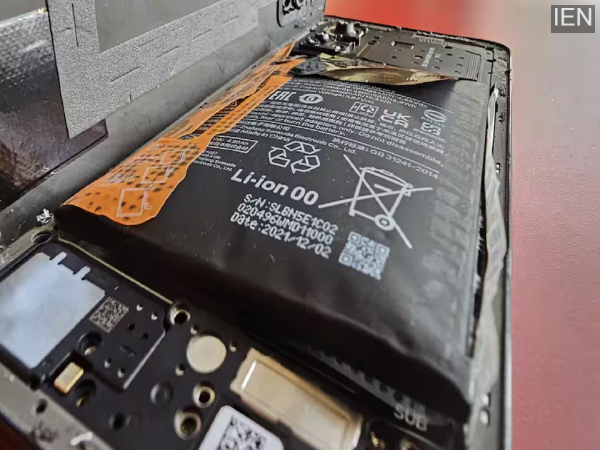
Despite advances in smartphone battery technology, complaints of swelling continue to surface. If your phone's battery has swollen, you should avoid making certain mistakes.
These days, smartphones are equipped with batteries comparable to the capacity of power banks. 10,000mAh batteries are becoming common in phones from Chinese companies. New silicon-carbon battery packs now allow for higher-capacity batteries without increasing the phone's size. Despite these advancements, battery malfunctions sometimes occur, leading to swelling. In many cases, battery swelling can be dangerous. So today, we're going to tell you what not to do if your phone's battery has swollen.
What not to do if your battery swells?
Do not use the device - If your smartphone's battery has swollen, stop using it immediately. If the device remains in use after the battery has swollen, the risk of a fire increases. Therefore, stop using the device immediately and consider battery replacement.
Do not connect to a computer or laptop - If the battery has swollen, do not connect the phone to a computer or laptop. If you connect it to the system, the USB-C wired connection will start charging the battery, which can be dangerous.
Do not attempt to repair it yourself - If you are not an expert, never attempt to repair the battery yourself. Doing so can prove dangerous. Similarly, do not attempt to remove the phone's casing. If a sharp object touches the battery during this attempt, there is a risk of explosion. Tampering with the phone's battery or puncturing it to release gas can cause an explosion. Turn off the device with a swollen battery and store it in a safe place. Always seek professional help to remove or replace the battery.
-
Iran-Israel war: India activates passenger help desk as flight cancellations rise
-
Akasa Air suspends Abu Dhabi, Doha, Jeddah, Kuwait and Riyadh flights for March 3 amid Israel-Iran war

-
When will Dubai Airports reopen? Operations at world’s busiest international hub continue to be suspended due to Middle East tensions

-
Dubai hit by Iran: Burj Khalifa, Burj Al Arab hotel, Palm Jumeirah island hit by explosions in UAE hotspot amid missile barrage. Check full list
-
Quote of the Day on power of music by Ed Sheeran: ‘There's no better way to get your point across than to put it in…’