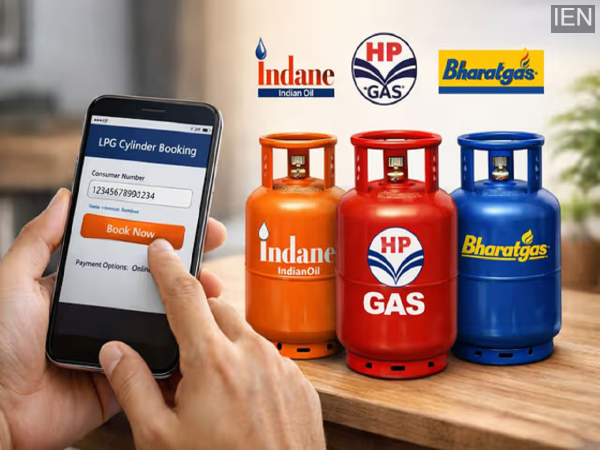
Indane, HP, and Bharat Gas have made several offline and online options available to customers for booking LPG cylinders, allowing users to easily book gas from the comfort of their homes in just a few minutes. Let's explore these methods.
There is no longer any need to stand in long queues to book an LPG cylinder. This is because Indane, HP Gas, and Bharat Gas have introduced several easy digital booking methods for their customers. These include a variety of convenient options such as WhatsApp, missed calls, mobile apps, IVRS, and online platforms. With the help of these tools, you can book a gas cylinder from home in just a few minutes.
How to Book an Indane Gas Cylinder?
- Several digital and offline options are available for Indane customers.
How to Book via WhatsApp?
- First, save the number 7588888824 in your phone's contacts.
- Open WhatsApp and start a chat with this number.
- Type "REFILL" and send it from your registered mobile number.
- The system will verify your details, and the cylinder will be booked.
- You will subsequently receive a confirmation message containing your booking details.
How to Book via the App?
- Visit the Play Store (for Android) or App Store (for iOS) on your smartphone.
- Search for and download the "IndianOil One App."
- After downloading, log in using your registered mobile number.
- Then, select the 'Order Cylinder' (Refill) option and submit your booking.
- You can choose to make the payment online or via 'Cash on Delivery.'
How to Book via SMS?
- Send an SMS (with the text "Refill") to 7718955555 from your registered mobile number.
- If you are using the SMS facility for the first time, you will need to register your mobile number.
- To do this, send an SMS to 7718955555 containing your 16-digit Consumer ID followed by the last 4 digits of your Aadhaar card number.
How to Book via IVRS (Phone Call)?
- To do this, call 7718955555 from your registered mobile number.
- Once the call connects, select your preferred language.
- Follow the voice instructions to confirm your Consumer Number or LPG ID.
- Confirm your refill request.
- Once the booking is complete, you will receive a confirmation message via SMS on your mobile phone, along with your refill booking number.
- In the event of any gas-related emergency, customers can call the helpline number 1906.
How to Book an HP Gas Cylinder?
- To book an HP Gas cylinder, customers can utilize various methods via their mobile phones, including IVRS calls, SMS, WhatsApp, and the mobile app.
HP Gas Booking via Phone (IVRS)
- Dial 8888823456 from your registered mobile number.
- Once the call connects, select your preferred language.
- Enter your 16-digit LPG ID or Customer Number for verification purposes.
- Follow the provided instructions to confirm your booking.
- Subsequently, you will receive an SMS confirmation on your mobile phone containing a booking reference number, which you can use to track your delivery.
HP Gas Booking via SMS
- Open the messaging app on your mobile phone.
- Type "HPGAS" in the message body.
- Send this message to 8888823456 using your registered mobile number.
- After sending the message, you will receive a confirmation SMS containing your booking details.
HP Gas Booking via WhatsApp
- Save the number 92222 01122 in your phone's contacts.
- Open WhatsApp and send a message typing "Hi" to this number.
- Follow the provided instructions to complete the cylinder booking process.
- Once the booking is complete, you will receive a confirmation message along with your Booking ID.
Cylinder Booking via the HP Mobile App
- Download the "HP Pay" mobile app from the Google Play Store or the Apple App Store.
- Log in or register using your Customer ID and registered mobile number.
- Tap on the "Book Cylinder" option within the app. Verify your details and confirm the booking.
- Immediately thereafter, you will receive a confirmation along with a booking reference number, which you can use to track the delivery status.
How to Book a Bharat Gas Cylinder?
- To book via IVRS, SMS, or WhatsApp, you must first register your mobile number by visiting the Bharat Gas website.
Bharat Gas Booking via Phone (IVRS)
- First, visit the Bharat Gas website to register your mobile number so that you can utilize the IVRS service.
- Next, call 7715012345 or 7718012345 using your registered mobile number.
- Once the call connects, select the "Book Cylinder" option by following the provided instructions.
- Enter your LPG Consumer Number or registered mobile number, along with other required details.
- Upon completion of the booking, you will receive an SMS containing the booking reference number and the estimated delivery date.
Bharat Gas Booking via SMS
- Open the messaging app on your mobile phone.
- Type "LPG" in the message body.
- Send this message to 7715012345 or 7718012345 using your registered mobile number.
- After sending the message, you will receive a confirmation SMS regarding your booking status.
Bharat Gas Booking via WhatsApp
- Save the BPCL Smartline number, 1800224344, in your phone's contacts.
- Open WhatsApp and send "Hi" or "Book" to this number.
- Complete the cylinder booking process by following the instructions displayed on the screen.
- Once the booking is complete, you will receive an SMS containing the booking reference number.
Bharat Gas Booking via Mobile App
- Download the Bharatgas app from the Google Play Store or Apple App Store.
- Register on the app and log in.
- Click on the 'Refill Cylinder' option and fill in the required details.
- Confirm the payment and complete the booking.
- Once the booking is successful, you will receive a booking reference number via SMS.
-
Who is Telugu poet Nandini Sidha Reddy set to receive Sahitya Akademi Award?
-
Hardeep Singh Puri’s daughter moves Delhi HC over ‘fake’ Epstein links claims

-
Meri Zindagi Hai Tu last episode: Divorce ending on cards?

-
Effect of screen time on spine and preventive measures

-
Hardeep Puri’s daughter Himayani Puri files defamation suit of Rs 10 crore in Delhi High Court, demands removal of online material linking Epstein