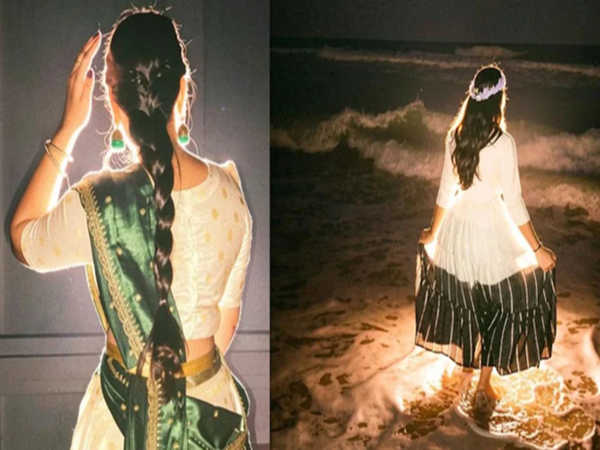
AI-powered filters and cinematic photo effects are rapidly trending on Instagram these days. One new and viral effect is the 'Lofi Dusk' filter. This filter completely transforms the lighting, shadows, and background aesthetics of photos, giving them a dark, cinematic look. This makes even ordinary photos appear professional and aesthetic.
The most striking feature of this filter is its dramatic contrast and rim lighting effect. It adds a dusk vibe to photos, a soft, cinematic atmosphere reminiscent of evening. This is why creators, influencers, and Instagram users are increasingly using this effect.
How is this feature available in Instagram Stories?
The Instagram app has made this feature available within the Stories section. Users can access it through the Restyle tool and the effect search option. Users can upload old photos from their gallery or click new ones directly from the Story camera.
Instagram is now focusing more on AI-based editing features so that users can create aesthetic content directly on the platform without the need for a separate editing app. The Lofi Dusk filter is also considered part of this strategy.
Where are you spending your money? Now ChatGPT will reveal the real truth about your 'wasteful spending'!
How to apply the Lofi Dusk filter using the Restyle feature?
If the Restyle feature is available on your Instagram account, you can easily use this viral effect. First, open the Instagram application and swipe right from the home screen to the Stories section.
Select a photo from your gallery. Then, tap the Restyle icon at the top. You'll see several AI-based filters. Find the 'Lofi Dusk' option and tap it.
After selecting the filter, Instagram's AI processing will begin. After a few seconds, your photo will be completely transformed into a cinematic dusk style. Once the processing is complete, press the Done button. You can then save the image or share it directly to your Story.
This feature is especially useful for those who want to create an aesthetic Instagram feed but don't want to use professional editing apps.
How to turn off Instagram Insta Stories? Learn the complete guide and best tricks for this new feature.
You can also apply filters using the Effect Search option.
If the Restyle feature isn't visible on your account, you can still use this viral filter. You'll need to use Instagram's Effect Browser.
First, open the Instagram Story camera. Swipe down the effects carousel until you see the 'Browse Effects' option. Tap it and type 'Lofi Dusk' into the search icon.
You'll see this effect in the search results. After selecting it, upload a photo from your gallery or click a new photo. The filter will automatically be superimposed on your image. You can then save or share the final output.
Don't see the feature? So what to do?
Some users aren't seeing the Restyle or Lofi Dusk features yet. In such a case, the first step is to update the Instagram app to the latest version. Sometimes, new AI features are available in older app versions.
Disclaimer: This content has been sourced and edited from NDTV India. While we have made modifications for clarity and presentation, the original content belongs to its respective authors and website. We do not claim ownership of the content.
-
CBSE Re-evaluation and Re-checking Application Process Begins, How to Apply and What is the Fee?

-
DRDO Internship 2026: Internship Opportunity for Engineering Students at DRDO—Find Out How Much the Stipend Will Be..

-
Changes to CA Syllabus: AI to be Introduced; ICAI Forms Committee..

-
DU Admissions 2026: Delhi University Releases BA LLB and BBA LLB Admission Schedule..

-
CBSE Extends Application Deadline for Class 12 Re-evaluation; Portal Troubles Students on Day One..