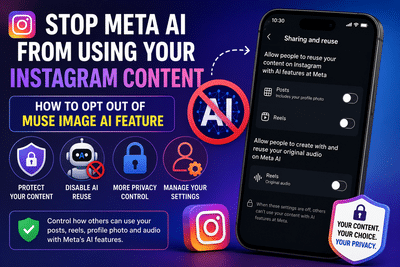
Step-by-Step Guide to Prevent Meta AI From Reusing Your Instagram Photos, Reels, and Audio
Meta's latest artificial intelligence tools have introduced new creative capabilities across its social media platforms, but they have also raised fresh concerns about user privacy. One of the most talked-about additions is the Muse Image AI feature, which can generate AI-powered images using publicly available Instagram content as a reference.
By default, eligible public content—including certain posts, profile photos, Reels, and original audio—may be available for AI-powered creation features. If you prefer to keep your content from being used in these AI experiences, Instagram provides several settings that allow you to limit or disable this functionality.
Whether you want complete privacy by making your account private or simply want to restrict AI access while keeping your profile public, here's a complete guide to managing these settings.
What Is Meta's Muse Image AI?Muse Image is Meta's AI-powered image generation technology designed to create new visuals using prompts and publicly available content from Instagram. Users can reference public accounts while generating AI images, allowing the system to produce images inspired by existing content.
While Meta says the feature is intended to encourage creativity, many users have expressed concerns about how their photos, profile images, Reels, and original audio could be referenced by AI-generated content.
As AI-powered features continue expanding across Meta's platforms, understanding and adjusting your privacy settings has become increasingly important.
Why Some Users Want to Disable AI ReuseMany Instagram users are choosing to limit AI access to their content for several reasons.
Some want greater control over how their images are used online, while others prefer that AI systems do not reference their public posts when generating new content.
Creators, photographers, influencers, and businesses may also wish to protect their original work from being reused without their direct approval.
Fortunately, Instagram offers multiple ways to reduce or prevent AI access to your content.
Option 1: Make Your Instagram Account PrivateThe simplest way to reduce access to your Instagram content is by switching your profile from public to private.
Once your account becomes private, only approved followers can view your posts, reducing the amount of publicly available content that AI systems can access.
Steps to Make Your Account PrivateThis option offers the strongest level of privacy for most users.
Option 2: Keep Your Account Public but Disable AI ReuseIf you prefer to maintain a public profile while limiting AI-related permissions, Instagram allows you to disable reuse settings without making your account private.
How to Turn Off AI ReuseThese settings help reduce how your public content can be referenced by Meta's AI creation tools while allowing your account to remain publicly visible.
Disable AI Reuse for Individual PostsInstagram also lets users manage AI permissions for specific posts and Reels instead of changing settings for the entire account.
Steps to Restrict a Single Post- Open Instagram.
- Visit your profile.
- Select the post or Reel you want to protect.
- Open the post options menu.
- Choose the option to disable reuse.
- Confirm your decision.
This gives creators greater flexibility by allowing them to protect selected content while leaving other posts unaffected.
Are Comments Also Protected?One important limitation remains.
Although users can disable AI reuse for many types of content, comments posted publicly may not be covered by the same controls. Users should therefore think carefully before sharing personal or sensitive information in public comment sections.
Things to Know Before Changing SettingsBefore updating your privacy preferences, keep these points in mind:
- Switching to a private account offers the strongest protection.
- Public accounts provide greater visibility but may expose more content to AI features.
- AI settings can usually be adjusted individually for posts, Reels, and original audio.
- Profile photos are generally included with post-related AI reuse settings.
- Review your privacy settings regularly, as Meta may introduce new AI features over time.
Yes. You can either make your Instagram account private or adjust the Sharing and Reuse settings to limit how your public content is used with Meta's AI features.
Will my existing posts remain visible?Yes. Disabling AI reuse does not delete your posts. It only changes how eligible content can be used with supported AI features.
Can I protect only certain posts?Yes. Instagram allows users to disable AI reuse for selected posts and Reels individually.
Final ThoughtsAs artificial intelligence becomes more integrated into social media platforms, reviewing privacy settings is becoming an essential part of managing your online presence. Instagram now offers multiple ways to control how your public content interacts with Meta's AI-powered tools.
Whether you choose to make your profile private or simply restrict AI reuse while keeping your account public, taking a few minutes to review these settings can help you maintain greater control over your photos, videos, and original content.
-
Leeds United announce full 2026-27 pre-season tour and friendly fixtures

-
Erling Haaland says England are ‘fortunate’ after witnessing close friend Jude Bellingham’s ‘world-class’ World Cup performance against Norway

-
Ferrari crashes into Jubilee Hills apartment, accused flee

-
Reports of Alia Bhatt exiting Ranbir Kapoor’s big film resurface

-
3 Indian Stars Whose T20I Career Might Have Ended With England Series