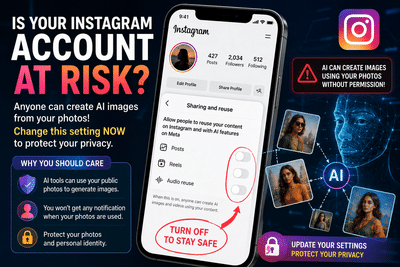
Meta's latest AI-powered image tool, Muse Image, has sparked fresh privacy concerns among Instagram users. The feature allows people to generate AI images inspired by content from public Instagram accounts by referencing a user's profile. As awareness of the feature grows, many users are looking for ways to limit how their photos and audio can be reused.
If your Instagram account is public, it's worth reviewing your settings to decide how your content can be used with Meta's AI features.
What Is Meta's Muse Image Feature?Muse Image is Meta's new AI image generation tool designed to create images using prompts and publicly shared Instagram content as context. According to Meta, the feature is intended for creative uses such as invitations, visual concepts, and social graphics.
However, because it can reference content from public profiles, many users have raised questions about privacy and control over their personal photos.
Why Are Users Concerned?The biggest concern is that public posts may be available for AI-powered reuse if the relevant settings remain enabled. Many users are unaware that content-sharing permissions can affect how their posts and audio interact with Meta's AI tools.
Privacy advocates have also pointed out that AI-generated images could potentially be misused if users do not regularly review their account settings.
How to Restrict AI Reuse of Your Instagram ContentIf you have a public Instagram account and want to limit AI-related reuse of your content, you can adjust your settings by following these steps:
These settings help you control how your public content can be reused within Meta's supported features.
Making Your Account Private Offers More ProtectionAnother effective way to limit AI-related reuse is by switching your Instagram account from Public to Private.
Under Meta's current policy, AI reuse features are generally intended for public accounts. Private accounts, along with accounts belonging to users under 18, are excluded from these capabilities.
If you don't need a public profile, changing your privacy setting can provide an additional layer of protection.
What About Existing AI-Generated Images?Changing your settings only affects future reuse permissions. If AI-generated content has already been created using your public content before the settings were changed, updating your preferences may not remove previously generated material.
For this reason, users concerned about privacy should review their account settings as soon as possible.
Tips to Improve Instagram PrivacyIn addition to reviewing AI settings, consider these best practices:
- Keep your account private if you don't need public visibility.
- Regularly review privacy and sharing settings after app updates.
- Limit the personal information you share publicly.
- Be cautious about posting high-resolution personal photos.
- Review permissions whenever Meta introduces new AI features.
Meta's Muse Image feature has brought renewed attention to how public social media content can interact with AI tools. While the company provides controls that allow users to manage content reuse, those settings may not always be widely known. Reviewing your Instagram privacy preferences, disabling AI content reuse where available, and switching to a private account if appropriate can help you maintain greater control over your photos and personal content.
-
AC Milan Manager Ruben Amorim Shows Interest in Noussair Mazraoui as Third Manchester United Target This Transfer Window
-
Jude Bellingham Shares Crucial Chat with His Mother Before England’s Win Over Norway
-
Airport security first, says Suvendu on Kolkata mosque access
-
England Test: Yastika Bhatia first woman to hit Test ton at Lord's

-
Middle East firms shift focus from AI adoption to AI ownership