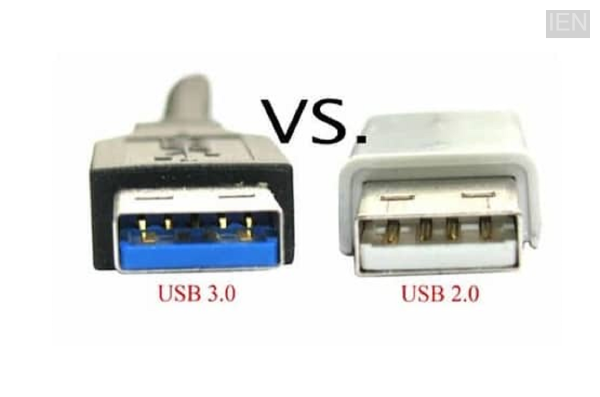
USB 2.0 vs. 3.0: USB (Universal Serial Bus) is a standard that enables computers and other electronic devices to connect.
USB 2.0 vs. 3.0: Data has become crucial in the digital world, and people use various devices to store it. Nowadays, devices such as pen drives, external hard disks, keyboards, mice, and printers connect to computers or laptops via USB. However, people often overlook certain factors when purchasing a new USB drive. There is frequently confusion regarding USB 2.0 and USB 3.0; therefore, we are here to explain the differences between the two and help you decide which one is the better choice for you.
What is USB?
USB, or Universal Serial Bus, is a standard that allows computers and other electronic devices to connect to one another. It facilitates data transfer and also provides power to various devices. USB technology has evolved over time, and multiple generations are now available on the market.
What is the difference between USB 2.0 and USB 3.0?
The most significant difference between these two USB versions lies in their data transfer speeds. USB 2.0 has a maximum theoretical speed of 480 Mbps (approximately 60 MB/s), whereas USB 3.0 reaches a maximum speed of 5 Gbps (approximately 625 MB/s).
This means that USB 3.0 is capable of transferring data many times faster than USB 2.0. Consequently, if you need to transfer large video files, high-resolution photos, or games, USB 3.0 is the better option for you.
Difference in Power Supply
It is worth noting that USB 3.0 is considered superior not only in terms of speed but also regarding power delivery. USB 2.0 provides power up to approximately 500mA, whereas USB 3.0 is capable of supplying up to about 900mA. This allows many devices to charge much faster and enables accessories like external hard drives to function more efficiently.
How to Distinguish Between the Two
Distinguishing between USB 2.0 and USB 3.0 is quite easy. The plastic insert inside a USB 3.0 port or connector is often blue, whereas the interior of a USB 2.0 port is typically black or white. Many companies also mark USB 3.0 devices with the "SuperSpeed" logo. However, since not all companies use the same color coding, be sure to read the information on the packaging before making a purchase.
Will USB 3.0 Work in Older Ports?
Yes; in fact, a key feature of USB 3.0 is that it is backward compatible. This means a USB 3.0 pen drive can be plugged into a USB 2.0 port, and a USB 2.0 device can be used in a USB 3.0 port. However, if you plug a USB 3.0 device into a USB 2.0 port, the speed you get will be limited to USB 2.0 levels.
Which One Should You Buy?
The choice of which USB port to buy depends entirely on your needs. If your work involves only transferring documents, PDFs, or small files, then USB 2.0 is the right choice for you. However, if you frequently copy large files, engage in video editing or gaming, or require high-speed data transfer, then USB 3.0 will prove to be the best option.
Things to Keep in Mind
It is important to consider a few key factors before purchasing a USB port. Buy a USB drive or cable from a reputable and reliable company.
Do not buy a USB product based solely on a low price.
If you plan to use it in the future, it is better to choose USB 3.0 or a newer version.
High-speed USB drives are most useful for large files.
-
Commonwealth Games: Tejaswin Shankar’s dream broken due to injury, tears in his eyes; Even after being out, his partner Sarvesh Kushare got the silver medal.

-
Pakistani police opened fire on protesters in PoJK’s Rawalakot, 14 people died.

-
Monsoon session: Government introduced bill against paper leak in Lok Sabha, opposition’s uproar continues

-
Supreme Court Orders Release Of Minors Held In Student Protests, Seeks Impartial Probe

-
Efforts for talks intensified amid US-Iran tension, mediators restarted efforts