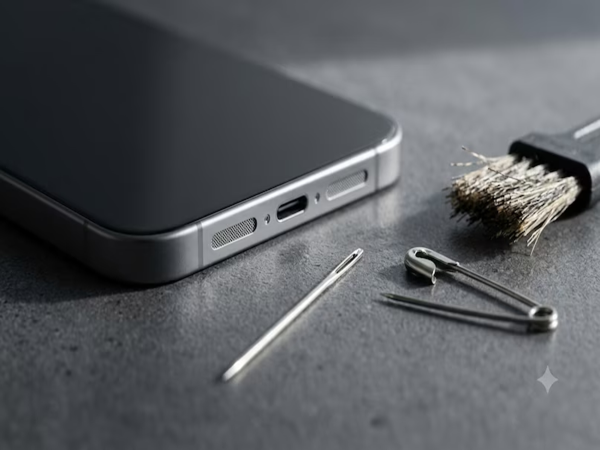
If your phone's speaker sounds quiet or muffled, the cause could be dust and dirt accumulated in the speaker grille. Learn how to safely clean your phone's speaker using a cotton swab, a soft brush, and a low-pressure air blower. Also, discover which mistakes can damage the speaker and what steps to take if water gets into it.
Nowadays, smartphones are used for much more than just making calls; they are used for watching videos, scrolling through reels, listening to music, and playing games. Consequently, the phone's speaker sees heavy daily use. Carrying the phone in pockets or bags, placing it on tables, and exposing it to open environments can lead to the accumulation of dust, fabric lint, and tiny particles in the speaker grille over time. This can result in quiet or muffled sound, reduced perceived volume, and compromised audio clarity.
If your phone's sound has become faint, you don't necessarily need to assume the speaker is broken. Often, audio quality suffers simply because dust and dirt have clogged the tiny holes of the speaker. In such cases, there is no immediate need to take the phone to a service center or have it opened up. By taking a few precautions, you can clean the loose dust from the speaker grille right at home.
Soft brush for stubborn dust: If dust remains in the speaker even after cleaning with a cotton swab, you can use a small brush with very soft bristles. Gently run the brush over the speaker mesh to dislodge the dust. Avoid scrubbing hard or pushing the brush bristles into the speaker holes. After cleaning, gently wipe away any dislodged dust with a soft, dry cloth. Never use a hard-bristled brush, needle, pin, or any other sharp object, as these can damage the speaker mesh or the delicate internal components. Remove dust with an air blower: If you have an air blower or a low-pressure dust blower at home, you can use it to clean dust from the speaker. This method eliminates the need to insert anything into the speaker's tiny holes. Hold the blower a short distance away from the speaker and release air using gentle pressure. This can dislodge loose dust and fabric fibers from the speaker grille. However, avoid directing high-pressure air straight into the speaker, as strong airflow can exert undue pressure on the phone's delicate internal components.
Can alcohol be used? When grime is heavily accumulated, some people consider using rubbing alcohol to clean the speaker. However, for ordinary dust and dirt, it is safer to first clean the area using a dry cotton swab, a soft brush, or an air blower rather than using any liquid. Clean the device according to the manufacturer's guidelines only when necessary. Avoid applying any liquid directly onto the speaker. If it is essential to use a slightly damp cotton swab, ensure it is not overly wet; excess liquid could seep through the speaker's small holes and damage the phone's electronic components.
What to do if water gets into the speaker? Exposure to rain, spills, or other liquids can cause the phone speaker's sound to become faint or muffled. In such situations, do not attempt to remove the water by inserting cotton swabs, pins, or other objects into the speaker holes. First, keep the phone away from moisture and water. Then, carefully wipe away any visible moisture using a soft, dry cloth. Even if the phone is claimed to be water-resistant, intentionally submerging it in water to clean the speaker is not safe. If you suspect water has entered the phone, follow the drying procedure recommended by the manufacturer. If the problem persists or the speaker sound does not return to normal, contacting a service center is the safest option.
Avoid these mistakes: Applying excessive pressure is the biggest mistake made when cleaning the phone's speaker. Forcing items like cotton swabs, brushes, cotton buds, or pins into the small speaker holes can damage the speaker mesh or delicate internal components. Additionally, do not pour water, alcohol, or any other cleaning liquid directly onto the speaker. It is also not advisable to open the phone and attempt to clean its internal parts yourself without proper technical knowledge. If the issue is simply due to ordinary dust, first try cleaning the speaker surface gently or using a low-pressure air blower. If this does not resolve the issue or if there is a significant change in sound quality, it is better to seek help from an expert or an authorized service center rather than experimenting on your own.
Disclaimer: This content has been sourced and edited from News18 Hindi. While we have made modifications for clarity and presentation, the original content belongs to its respective authors and website. We do not claim ownership of the content.
-
‘They need him!’ - Paul Scholes urges Manchester United to sign £75m Newcastle defender after Luke Shaw struggles

-
Newcastle United’s Nick Woltemade to undergo Juventus medical on Tuesday

-
Sexual harassment session leads to teacher’s suspension in Medak

-
Nepal death toll rises to nearly 1,000 amid fresh flood alerts

-
Telangana cops attacked in Maharashtra while arresting accused