

Many features useful for users have been provided on WhatsApp, the most used instant messaging app in the world. Today we are going to tell you about one such secret feature, this feature helps in saving mobile data of your phone during WhatsApp Calls. (Photo credit- Freepik)

The name of this secret feature hidden in WhatsApp is Use Less Data For Calls. There will be many people who are not aware of this feature, let us know how you can turn on this feature by going to WhatsApp settings. (Photo credit- Freepik)

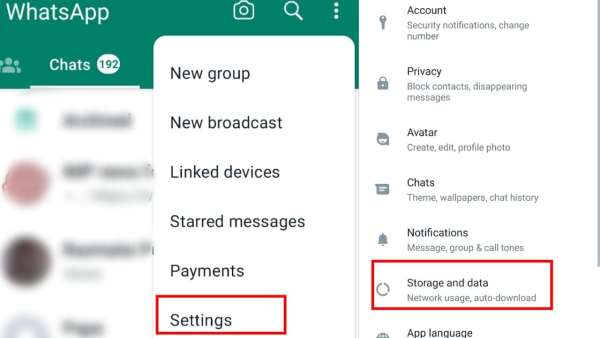
First of all, open WhatsApp in the phone, after opening the app, you have to click on the three dots on the top right side. As soon as you tap on the three dot icon, some options will open in front of you, out of these you will have to click on the Settings option. (symbolic picture)
After clicking on WhatsApp settings, once again many options will appear in front of you, but you do not have to get confused. You people have to tap on the storage and data option. (Photo credit- WhatsApp app)
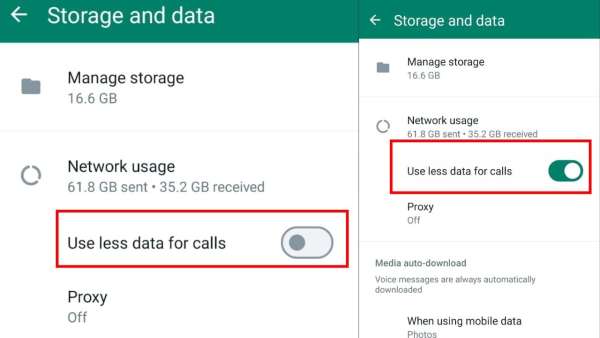
After clicking on the Storage and Data option, you will have to click on the Use less data for calls option. After clicking on this option, the next time you talk on WhatsApp calls, your mobile data will be consumed less than before. (Photo credit- WhatsApp app)
-
Lovepreet''s record silver headlines day; Neeraj, two others reach javelin final

-
Son of a tailor, Punjab''s Lovepreet wins silver with CWG ''snatch'' record

-
Bengaluru Restaurants' Pushback Gives Rapido's Ownly An Opening Against Swiggy, Zomato

-
Ajinkya Rahane Retires: A Look Back at His Impact on Indian Cricket

-
UEFA Unanimously Rejects FIFA's Proposal to Sell World Cup Stakes