
Today WhatsApp is not just a means of communication. Things have gone much beyond the morning good morning messages and Babu Sona's gossip. WhatsApp is a big source for everything from payments to business. But this source is also a big weapon of cyber-thugs. WhatsApp has become the biggest hub of online fraud these days. There are so many ways that if you try to count them, maths will fail. Sometimes the robbery is being carried out by clicking on a link and sometimes by an unknown phone call. I wish there was a suitable solution for this (WhatsApp Privacy Feature). Don't worry…
Be silent or else I will become violent.
This feature is to avoid calls from unknown numbers which is the latest method of cheating these days. In this method, calls come mostly from numbers with +92. There is a picture of a policeman in the DP and it is said that someone close to you is trapped in a rape case. There is also an act of crying and whining. Money is demanded to save the person from the case. All this happens so quickly that many times people get trapped in it. While the person who is being talked about is comfortably sleeping in the next room. The best solution to this is to turn on 'Silence Unknown Callers'. Neither the bamboo will remain nor the flute will play. You will not receive any useless calls.
You will find the option under Privacy in Settings.
Close the link link
You must have noticed that when you share a link on WhatsApp, its preview starts appearing on the chat window itself. This feature is very good for the eyes, but not for the hacker. Due to this preview, the IP address of your device can be known. This much information is enough for fraud. This is called Disable Link Previews. We will tell you in a little while where to find this.
Nobody knows the IP address.
IP addresses can be found not only through message links but also through calls. There is a solution for this as well. Protect IP address in calls. You will get both options in one place, that is why we stopped you.
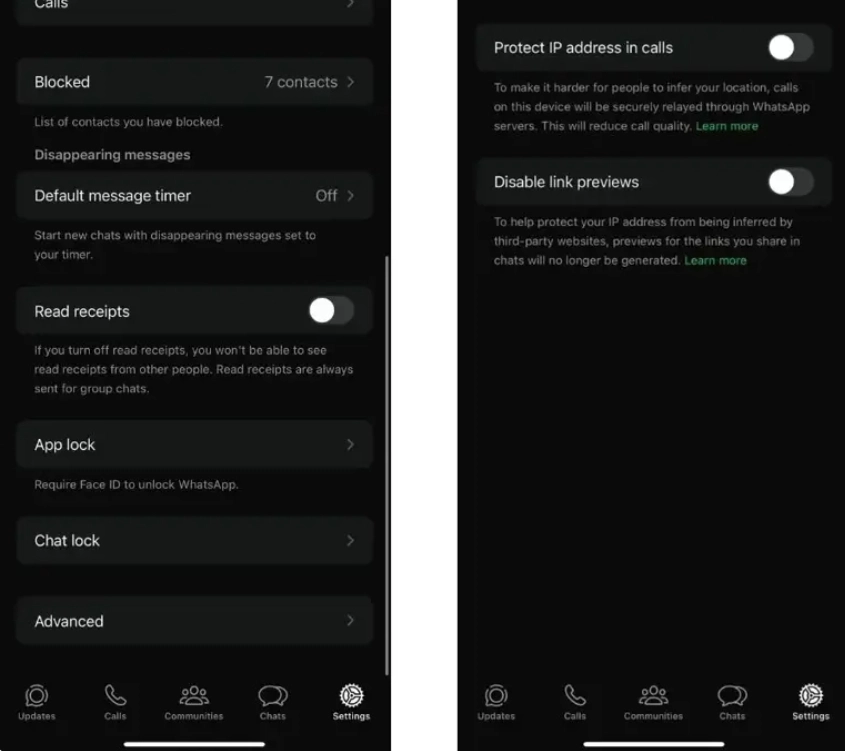
In Settings, you will see Advanced under Privacy. There are only two options here. You know what to do.
However, there is no guarantee that you will not be cheated by doing this. But the chances of cheating can be reduced. What does one lose in using it?
-
Capricorn Daily Horoscope Today (Dec 22 - Jan 19), July 14, 2026: Stay Patient in Finances, Value Your Close Ones

-
Gemini Daily Horoscope Today (May 21 - Jun 20), July 14, 2026: Fresh Starts on the Horizon, Positive Energy in Love

-
Leo Tarot Horoscope Today, July 14, 2026: Leadership will stay strong, positivity will guide your decisions

-
Bayern Munich pursue Jules Kounde as Barcelona defender’s transfer position becomes clear

-
Erling Haaland Returns Home from World Cup with a Stuffed Raccoon in Hand