
WhatsApp Tips and Tricks: WhatsApp is the most used instant messaging app in the world, the app has many great features for the convenience of the users. WhatsApp is the best way to stay connected with each other, through this app you can not only chat but also share photos, videos and other important files. But do you know that WhatsApp also has a secret feature which shows which user you have talked to the most.
Are you shocked, how can this be found out? If you want to find out with whom your partner chats the most on WhatsApp, then you can find this out by following some simple steps.
WhatsApp Features: Follow these steps
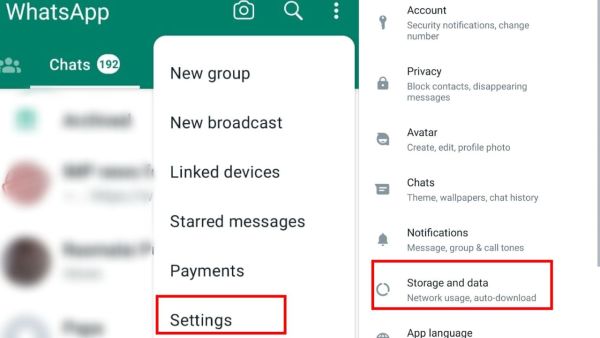
First of all, open WhatsApp on your phone, after the app opens, you have to click on the three dots appearing on the top right side. After tapping on the three dots, you have to click on the Settings option.
(Photo Credit- WhatsApp App)
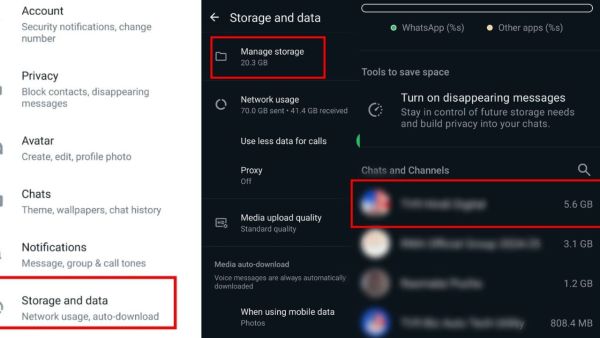
After clicking on WhatsApp settings, you will see the Storage and Data section, click on this option. The first option you will find in the Storage and Data section is Manage Storage.
(Photo Credit- WhatsApp App)
Click on this option of Manage Storage, as soon as you click on this option, you will see a complete list of chats. The person whose name is at the top of this list is the person with whom you have chatted the most and you have also shared media files such as photos and videos the most with that person.
pay attention
The chat with which we talk the most and share media files consumes the most storage on WhatsApp. Now, by looking at the chats that are taking up the most storage, you can understand on which number you talk the most?
-
Shreyas Iyer Analyzes India's Defeat in T20I Series Against England

-
Belgium's Heartbreaking Exit from FIFA World Cup 2026: Players Reflect on the Journey

-
Heather Knight Announces Retirement from International Cricket After Final Test

-
Emergency Evacuation at Michigan Mall Due to Active Shooter Reports

-
Mystery Surrounds Death of Mississippi College Football Player Nolan Wells