A small mistake while using WhatsApp can even get your account banned. To ensure that users feel safe on the platform, the company takes action against lakhs of accounts every month and bans them. WhatsApp accounts are not banned just like that, users make some mistakes due to which the company has to take these strict steps. WhatsApp has clarified in the FAQ section on its official site as to why the company 'locks' users' accounts.
WhatsApp Mistakes: Avoid making these mistakes
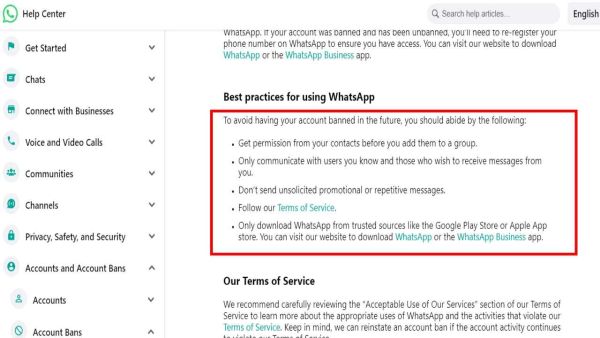
If you add a user on WhatsApp without their permission, message unknown people on WhatsApp, forward or share promotional messages with people. Not only this, if you break the rules made by the company, you can also be banned. If a person spreads hatred in the society or shares obscene content through WhatsApp, his account can also be banned.
(Photo credit- WhatsApp)
WhatsApp Account Banned Solution: This is how the account will be recovered
Many times people feel that WhatsApp has banned their account by mistake. If your account has also been banned and you also feel the same, then let us know what you have to do. Go to https://www.whatsapp.com/contact/?subject=messenger and write your message in the message and send a request to the company.
Note that before submitting the request, you will have to provide email, mobile number, method of using WhatsApp (iPhone, Web, Android or desktop) and write your message. After the company receives the request, your complaint will be reviewed. If the company really feels that the account has been banned by mistake, then the company will unlock your account.
-
Manchester United Scout to Accompany 17-Year-Old Cristian Orozco for Medical in Manchester

-
Moog Cutlet: Want something quick to snack on? Then make healthy and tasty moong dal cutlets at home, read the recipe

-
Homemade Uttapam: Why have the same breakfast every morning? Try today the best recipe of South Indian dish Uttapam.

-
Redmi Note 17 Pro gets 67W charging certification on China’s 3C database ahead of July launch

-
Just saying two words will lock your smartphone! Get started with this amazing Voice feature in an instant… just follow these steps