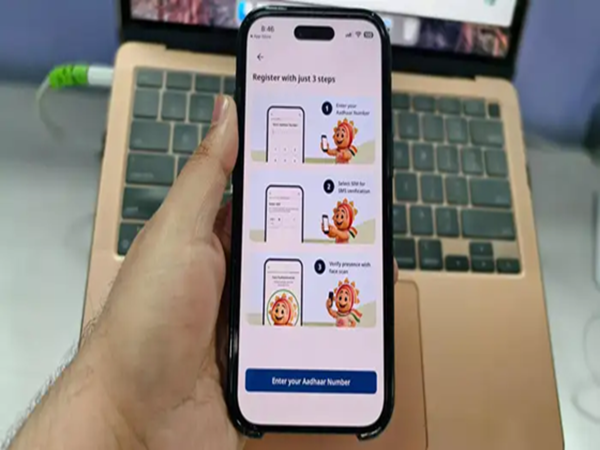
On January 28, UIDAI launched the full version of its Aadhaar app. With this launch, while the Aadhaar app gained the feature to verify others' Aadhaar numbers, its look and feel also changed. By changes in the look and feel of the Aadhaar app, we mean that the location of the features and options previously available in the app has been altered. This raises the question: has the method for changing your number or address on the full version of the Aadhaar app also changed?
Let's understand the process, from registration to changing your linked number and address, on the new Aadhaar app. We'll also learn how you can now lock or unlock your biometric data on the new Aadhaar app.
How to register on the new Aadhaar app
After UIDAI made the new Aadhaar app, or rather the full version of the Aadhaar app, available, the app's design and the location of its options have changed. Therefore, the steps to use the different features of the Aadhaar app have also changed somewhat. However, the registration process on the app remains completely unchanged. If you are not yet an Aadhaar app user, download the Aadhaar app from the Play Store or App Store. After that:
Click on "Continue to Register" on the app's home page.
Then enter your Aadhaar number.
Accept the terms and conditions.
Then click on "Continue to Send SMS" to link your SIM card to the app.
After your mobile number is verified, click on "Continue".
Now, click on "Continue to Face Authentication" to perform face recognition and then click on "Continue".
The app will then fetch and verify your details.
Now set a PIN for your app.
Once you do this, you will be registered on the new Aadhaar app and can start using the app.
How to update your number in the Aadhaar app
If you want to update the phone number linked to your Aadhaar in the full version of the Aadhaar app, you will now find this option in a different location. To do this, click on the "Services" tab shown below. Here you will see all the service options provided by the app.
Tap on "Mobile Number Update".
Then click on "Continue to Update Mobile Number". Now enter the new mobile number you want to link.
An OTP will be sent to your new mobile number. Enter that OTP in the app for verification.
Complete the authentication process as per the instructions given in the app.
After successful OTP verification, your request to update your mobile number will be sent to UIDAI.
This process will take 15 days, and a fee of Rs. 75 will be charged.
How to update your address in the new Aadhaar app?
The option to update your address in the new Aadhaar app is also available in the Services tab at the bottom of the home page. Click on Address Update and then:
Then choose how you want to update your address. You can use a document such as your electricity bill, phone bill, etc. Or you can update your address through the Aadhaar of a family member.
If you are updating your address using a document, tap on Using Your Documents.
Then click on Continue to Update Address.
Select the document you want to use to update your address in Aadhaar.
Then, verify the new details and complete the Face Authentication.
Finally, make the payment and submit your request.
This process will also take 15 days, and a fee of Rs. 75 will be charged.
Updating address using a family member's Aadhaar
If you want to update your address on your Aadhaar card using the Aadhaar card of a family member, you will need the Aadhaar number of that family member. Then:
Click on Using Family Member’s Aadhaar.
Click on Continue to Update Aadhaar.
Now provide the details of the family member.
Complete the Face Authentication.
Make the payment and submit your request.
This process will also take 15 days, and a fee of Rs. 75 will be charged.
How to lock your biometrics in the new Aadhaar app
If you want to lock your biometric data in the new Aadhaar app to prevent its misuse, you no longer need to navigate through different sections to find the correct option. This option is now available on the home page of the new app. To do this, simply click on "Biometrics Unlocked" located below your Aadhaar QR code on the home page, then tap on "Confirm Biometric Lock," and finally click on "Yes, Confirm." Your biometric data will then be locked.
-
About Anurag Thakur's Viral Louis Vuitton Belt From Lok Sabha: Does It Cost ₹1 Lakh?

-
Surya Grahan 2026 Date: A solar eclipse will occur on the day of Falgun Amavasya; will it be visible in India or not?

-
Essential Kitchen Items for Prosperity According to Vastu Shastra

-
Valentine's Week 2026: The week of love will begin on February 7th; see the complete list from Rose Day to Valentine's Day here..

-
Gold Price Today: The ongoing decline in gold prices has been halted; know the rate at which gold is being sold in your city on February 3rd.