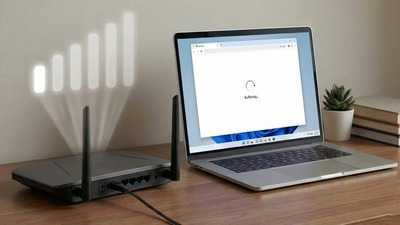
#TechBytes: Where to place wi-fi router to enhance speed
11 Mar 2026
Improving WiFi signal strength can be a daunting task, especially when you have a large home or office space.
However, with the right router placement strategies, you can significantly enhance your network's performance.
By understanding how to position your router effectively, you can ensure better coverage and faster internet speeds.
Here are some practical tips to help you optimize your router's location for maximum signal strength.
Centralize your router location
Tip 1
Positioning your router at the center of your home or office can help distribute the signal evenly in all directions.
This way, you can minimize dead zones and ensure that every corner of your space gets a decent connection.
Avoid placing it near walls or corners as these can obstruct signals and reduce coverage.
Elevate your router
Tip 2
Placing your router on a high shelf or mount can also improve its range.
Higher placement allows the signal to travel further without obstacles like furniture or appliances blocking it.
Ideally, keep it at least three feet above the floor for optimal performance.
Avoid interference from other devices
Tip 3
Electronic devices such as microwaves and cordless phones can interfere with WiFi signals.
Keep your router away from such devices to avoid disruptions in connectivity.
Also, avoid placing it near metal objects, which can reflect signals and weaken the network.
Use open spaces for better coverage
Tip 4
Open spaces facilitate better signal propagation than closed ones.
Try to keep your router in an open room, away from thick curtains or heavy furniture that could absorb or block signals.
This way, you can ensure that the WiFi reaches farther and more efficiently, giving you a stronger and more reliable internet connection throughout your space.
Experiment with different placements
Tip 5
Every home is different, so it may take some trial and error to find the best spot for your router.
Test different locations by checking signal strength with devices in various parts of your home or office.
Once you find an optimal position, stick with it for consistent performance.
-
MP SET 2026 Answer Key: Answer key for MP State Eligibility Test Paper 1 and 2 released, download here now..
-
Meghalaya: Two Meghalaya Board 12th exams postponed due to violence in West Garo Hills, new dates to be announced soon..

-
NCERT: The new Class 9 English textbook has reduced the syllabus and given more space to works by Indian authors..

-
IGNOU June 2026 TEE: Applications for IGNOU TEE June exam begin, forms can be filled till this date in April..

-
RBSE 10th Result: Rajasthan Board 10th results will be declared soon, board has given information; keep your roll number ready..